
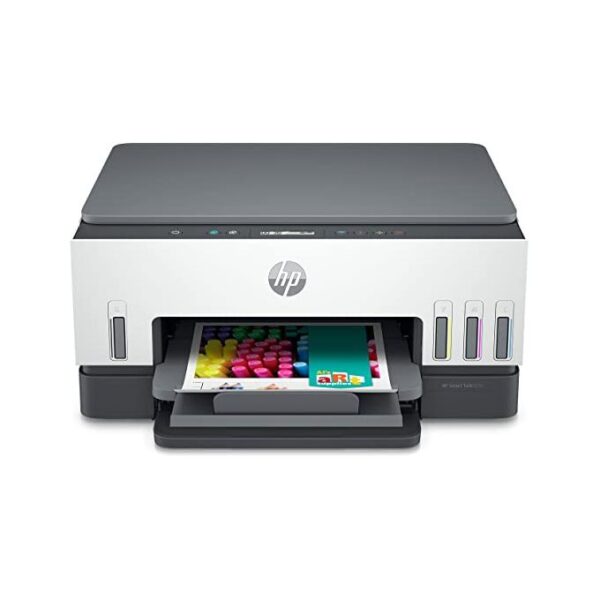


HP Smart Tank 670 All-in-one Printer

Product details
Description
HP Smart Tank 670 All-in-One Printer 6UU48A
Simplify at-home printing with mobile setup, two-sided printing, smart-guided buttons, Low on Ink sensors, and fewer interruptions. Plus, get more value from high-volume ink – up to three years of Original HP Ink included in the box.
Speed through multi-page documents with automatic two-sided printing. Count on dark, crisp text, and get vibrant colour graphics for all your prints. Streamline workflow with Shortcuts, on the HP Smart app. Print, scan, share, and more – in just a tap.
This printer is made from recycled printers and other electronics – more than 25% by weight of plastic. EPEAT Silver certified printer: an environmentally conscious choice. Count on easy cartridge recycling at no charge through HP Planet Partners.
Use the guided, step-by-step videos to quickly set up your printer. Get faster, more reliable connections using dual band Wi-Fi® with self-healing. Easily manage tasks with smart-guided buttons that illuminate and guide you through the printing process.
Get up to 18,000 black or 8,000 colour pages of Original HP Ink included in the box. Print at high volumes at an extremely low cost-per-page with this cartridge-free system. Replenishing ink is clean and easy with HP’s innovative spill-free refill system.
Specifications
Functions: Print, Scan, Copy, Wireless
Multitasking supported: No
Print speed black (ISO): Up to 12 ppm
Print speed color (ISO): Up to 7 ppm
Print speed black (draft, A4): Up to 22 ppm
Print speed color (draft, A4): Up to 21 ppm
Print speed black (ISO, A4): Up to 12 ppm
Print Speed Color (ISO): Up to 7 ppm
First page out black (A4, ready): As fast as 15 sec
First page out color (A4, ready): As fast as 18 sec
Duty cycle (monthly, A4): Up to 3,000 pages
Recommended monthly page volume: 400 to 800 (HP recommends that the number of pages per month of imaged output be within the stated range for optimum device performance, based on factors including supplies replacement intervals and device life over an extended warranty period.)
Number of users: 1-3 Users
Print technology: HP Thermal Inkjet
Printer drivers included: HP PCL 3 GUI
Print quality black (best): Up to 1200 x 1200 rendered dpi
Print quality color (best): Up to 4800 x 1200 optimized dpi color when printing from a computer and 1200 input dpi
Processor speed: 800 MHz
Print languages: HP PCL 3 GUI
Display: 2-line LCD Smart guided buttons, 50.8 x 10.16 mm (2.0 x 0.4 in)
Print colors: Yes
Automatic paper sensor: No
Mac compatible: Yes
Printer Management: No
Mobile printing capability: Apple AirPrint; Mopria certified; HP Print Service Plugin (Android printing); HP Smart app; Wi-Fi Direct Printing
Wireless capability: Yes, 2.4/5G dual band Wi-Fi, Wi-Fi Direct, BLE
Connectivity, standard: Hi-Speed USB 2.0; Wifi; Bluetooth LE
Minimum System Requirements: Windows 10, 7: 32-bit or 64-bit, 2 GB available hard disk space, Internet connection, Internet Explorer.
Minimum System Requirements for Macintosh: macOS v10.14 Mojave, macOS v10.15 Catalina, macOS v11 Big Sur; 2 GB HD; Internet required
Compatible Operating Systems: Windows 11, Windows 10, 7; macOS v10.14 Mojave, macOS v10.15 Catalina, macOS v11 Big Sur;(Windows 10, 7: 32-bit or 64-bit; macOS v10.14 Mojave, macOS v10.15 Catalina, macOS v11 Big Sur; 2 GB available hard disk space; Internet connection; Internet Explorer)3
Memory: 128 MB
Maximum Memory: 128 MB
Memory Slots: No
Paper handling input, standard: 150-sheet input tray
Input capacity: Up to 150 sheets
Maximum input capacity (sheets): Up to 150 sheets
Paper handling output, standard: 100-sheet output tray
Output capacity: Up to 100 sheets
Maximum output capacity (sheets): Up to 100 sheets
Duplex printing: Automatic
Paper trays, standard: 1
Paper trays, maximum: 1
Envelope Feeder: No
Maximum Input Capacity (envelopes): Up to 10 envelopes
Media sizes supported: A4; A5; A6; B5 (JIS); Envelope (DL, C5, C6, Chou #3, Chou #4); Card (Hagaki, Ofuku Hagaki)
Media sizes, custom: 88.9 x 127 mm to 215.9 x 355.6 mm
Media types: Plain Paper, HP Photo Papers, HP Matte Brochure or Professional Paper, HP Matte Presentation Paper, HP Glossy Brochure or Professional Paper, Other Photo Inkjet Papers, Other Matte Inkjet Papers, Other Glossy Inkjet Papers, Light/Recycled
Media weight, recommended: 60 to 105 g/m²
Media weight, supported: Plain paper: 60 to 105 g/m²; Envelopes: 75 to 90 g/m²; Cards: up to 200 g/m²; Photo paper: up to 250 g/m²
Borderless printing: Yes (up to 8.5 x 11 in, 210 x 297 mm)
Scanner type: Flatbed
Scan file format: BMP, JPEG, TIFF, PDF, PNG
Scan resolution, optical: Up to 1200 dpi
Bit depth: 24-bit
Scan size, maximum: 216 x 297 mm
File Format Supported: PDF; BMP; PNG; TIF; JPG
Copy speed black (ISO): Up to 11 cpm
Copy speed color (ISO): Up to 5 cpm
Copy resolution (black text): Up to 600 dpi
Copy resolution (black graphics): Up to 600 dpi
Copy resolution (color text and graphics): Up to 600 x 600 dpi
Copy reduce / enlarge settings: 25 to 400%
Copies, maximum: Up to 99 copies
Copier settings: Number of Copies, Access copier settings of Resize, Quality, Lighter/Darker, Papersize, Papertype settings via HP Smart
Power: Input voltage: 100 to 240 VAC (+/- 10%), 50/60 Hz (+/- 3 Hz)
Power supply type: Internal
Power consumption: 0.10 Watts (Off Mode), 2.00 Watts ( Sleep mode)
Typical electricity consumption (TEC) number: 0.30 kWh/Week
Ecolabels: EPEAT® registered; CECP; SEPA
Energy star certified: No
Operating temperature range: 5 to 40°C
Recommended operating humidity range: 20 to 80% RH
Minimum dimensions (W x D x H): 42.75 x 36.40 x 19.86 cm
Maximum dimensions (W x D x H): 427.54 x 440.73 x 198.55 mm
Weight: 6.38 kg
Package dimensions (W x D x H): 484 x 239 x 410 mm
Package weight: 9.20 kg
What’s in the box:
- HP Smart Tank 670 All-in-One
- 3 x HP GT53XL 135-ml Black Original Ink Bottle
- HP GT52 Cyan Original Ink Bottle
- HP GT52 Magenta Original Ink Bottle
- HP GT52 Yellow Original Ink Bottle
- Power cord
- HP Black color printhead
- HP Tri color printhead
- Setup guide
- Reference guide
- Ink caution flyer
- Regulatory flyers
- warranty flyers
Cable included: No, please purchase USB cable separately
Replacement cartridges: HP GT53 90-ml Black bottle (~4000 pages); HP 53XL 135-ml Black bottle (~6000 pages); HP GT52 70-ml Cyan bottle (~8000 pages); HP GT52 70-ml Magenta bottle (~8000 pages); HP GT52 70-ml Yellow bottle (~8000 pages).
Software included: HP Printer Software, available online
Shipping and Returns
Shipping cost is based on weight. Just add products to your cart and use the Shipping Calculator to see the shipping price.
We want you to be 100% satisfied with your purchase. Items can be returned or exchanged within 30 days of delivery.
There are no question found.
Quick Comparison
| HP OfficeJet Pro 9013 All-in-one Printer remove | SHARP MX-M265NV Multifunctional Monochrome Printer remove | HP OfficeJet Pro 9123 All-in-One Printer (403W0C) remove | HP Smart Tank 581 All-in-One Printer (4A8D4A) remove | HP OfficeJet Pro 9730 Wide Format All-in-One Printer (537P5C) remove | |
|---|---|---|---|---|---|
| Name | HP OfficeJet Pro 9013 All-in-one Printer remove | SHARP MX-M265NV Multifunctional Monochrome Printer remove | HP OfficeJet Pro 9123 All-in-One Printer (403W0C) remove | HP Smart Tank 581 All-in-One Printer (4A8D4A) remove | HP OfficeJet Pro 9730 Wide Format All-in-One Printer (537P5C) remove |
| Image | 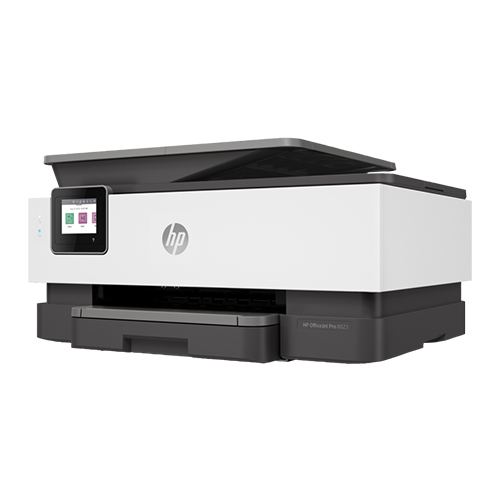 |  |  |  |  |
| SKU | |||||
| Rating | |||||
| Price | ₦295,000.00 | ₦4,140,000.00 | ₦360,000.00 | ₦260,000.00 | ₦415,000.00 |
| Stock | |||||
| Availability | |||||
| Add to cart | |||||
| Description |
| Key FeaturesThe SHARP MX-265NV is a reliable, feature-rich multifunctional printer tailored for busy work environments that demand efficiency, versatility, and exceptional output quality. Designed to streamline office operations, this powerhouse combines printing, copying, and scanning capabilities with cutting-edge technology to deliver unmatched performance. Outstanding Performance
| Orderable supplies
HP 936 Black Original Ink Cartridge 4S6V2LN, HP 936 Cyan Original Ink Cartridge 4S6U9LN; HP 936 Magenta Original Ink Cartridge 4S6V0LN; HP 936 Yellow Original Ink Cartridge 4S6V1LN; HP EvoMore planned to be available April 2024: HP 936e EvoMore Black Original Ink Cartridge 4S6V6LN; HP 936e EvoMore Cyan Original Ink Cartridge 4S6V3LN; HP 936e EvoMore Magenta Original Ink Cartridge 4S6V4LN; HP 936e EvoMore Yellow Original Ink Cartridge 4S6V5LN
Print Cartridges/Bottle, Number
4 (1 each black, cyan, magenta, yellow)
Print quality black (best)
Black: 1200 x 1200 rendered dpi Color: Up to 4800 x 1200 optimized dpi on HP Advance Photo Paper 1200 x 1200 dpi input
Recommended monthly page volume
Up to 1500
Print quality color (best)
Up to 4800 x 1200 optimized dpi on HP Advance Photo Paper 1200 x 1200 dpi input
Print technology
HP Thermal Inkjet
| Functions
Print, copy, scan
Print speed black (ISO, A4)
Up to 12 ppm
Recommended monthly page volume
400 to 800
Print technology
HP Thermal Inkjet
Printer drivers included
HP PCL 3 GUI
Print quality black (best)
Black: Up to 1200 x 1200 rendered dpi Color: Up to 4800 x 1200 optimized dpi color (when printing from a computer and 1200 input dpi)
| Orderable supplies
HP 936 Black Original Ink Cartridge 4S6V2LN, HP 936 Cyan Original Ink Cartridge 4S6U9LN; HP 936 Magenta Original Ink Cartridge 4S6V0LN; HP 936 Yellow Original Ink Cartridge 4S6V1LN; HP EvoMore planned to be available April 2024: HP 936e EvoMore Black Original Ink Cartridge 4S6V6LN; HP 936e EvoMore Cyan Original Ink Cartridge 4S6V3LN; HP 936e EvoMore Magenta Original Ink Cartridge 4S6V4LN; HP 936e EvoMore Yellow Original Ink Cartridge 4S6V5LN
Print Cartridges/Bottle, Number
4 (1 each black, cyan, magenta, yellow)
Print quality black (best)
Black: Up to 1200 x 1200 rendered dpi Color: Up to 4800 by 1200 optimized dpi on HP Advance Photo Paper 1200 by 1200 dpi input
Recommended monthly page volume
250 to 1500 [5] HP recommends that the number of printed pages per month be within the stated range for optimum device performance, based on factors including supplies replacement intervals and device life over an extended warranty period.
Print quality color (best)
Up to 4800 by 1200 optimized dpi on HP Advance Photo Paper 1200 by 1200 dpi input
Print technology
HP Thermal Inkjet
|
| Content | A revolutionary smart printer that works the way you need it. Help save time with Smart Tasks shortcuts. Get automatic two-sided printing and scanning, seamless connections, and best-in-class security. Print and scan from your phone.
Dynamic security enabled printer. Only intended to be used with cartridges using an HP original chip. Cartridges using a non-HP chip may not work, and those that work today may not work in the future.
Functions
| The SHARP MX-265NV is a reliable, feature-rich multifunctional printer tailored for busy work environments that demand efficiency, versatility, and exceptional output quality. Designed to streamline office operations, this powerhouse combines printing, copying, and scanning capabilities with cutting-edge technology to deliver unmatched performance.
Outstanding Performance
Key FeaturesThe SHARP MX-265NV is a reliable, feature-rich multifunctional printer tailored for busy work environments that demand efficiency, versatility, and exceptional output quality. Designed to streamline office operations, this powerhouse combines printing, copying, and scanning capabilities with cutting-edge technology to deliver unmatched performance. Outstanding Performance
| Orderable supplies
HP 936 Black Original Ink Cartridge 4S6V2LN, HP 936 Cyan Original Ink Cartridge 4S6U9LN; HP 936 Magenta Original Ink Cartridge 4S6V0LN; HP 936 Yellow Original Ink Cartridge 4S6V1LN; HP EvoMore planned to be available April 2024: HP 936e EvoMore Black Original Ink Cartridge 4S6V6LN; HP 936e EvoMore Cyan Original Ink Cartridge 4S6V3LN; HP 936e EvoMore Magenta Original Ink Cartridge 4S6V4LN; HP 936e EvoMore Yellow Original Ink Cartridge 4S6V5LN
Print Cartridges/Bottle, Number
4 (1 each black, cyan, magenta, yellow)
Print quality black (best)
Black: 1200 x 1200 rendered dpi Color: Up to 4800 x 1200 optimized dpi on HP Advance Photo Paper 1200 x 1200 dpi input
Recommended monthly page volume
Up to 1500
Print quality color (best)
Up to 4800 x 1200 optimized dpi on HP Advance Photo Paper 1200 x 1200 dpi input
Print technology
HP Thermal Inkjet
Printer drivers included
Windows HP Driver (Pcl3), Linux, UNIX, SAP
Display
2.7" (6.86 cm) Capacitive Touchscreen CGD
Processor speed
1.2 GHz
Print languages
HP PCL3 GUI
Paper handling input, standard
250-sheet input tray; 35-sheet ADF
Paper handling output, standard
60-sheet output tray
Duplex printing
Automatic
Maximum Input Capacity (envelopes)
Up to 30 envelopes
Borderless printing
Yes, on photo paper only, up to 8.5 x 11 in (US letter), 210 x 297 mm (A4)
Media types
Plain Paper, HP Photo Papers, HP Matte Brochure or Professional Paper, HP Matte Presentation Paper, HP Glossy Brochure or Professional Paper, Other Photo Inkjet Papers, Other Matte Inkjet Papers, Other Glossy Inkjet Papers, Thick Plain Paper, Light/Recycled Plain Paper, HP Tri-fold Brochure Paper, Glossy
Mobile printing capability
Chrome OS; HP Smart app; Apple AirPrint™; Wi-Fi® Direct Printing; Mopria™ Certified [4]
Wireless capability
Yes, with built-in dual-band Wi-Fi 802.11 a/b/g/n/ac and a self-heal solution
Connectivity, standard
1 Ethernet; 1 Hi-Speed USB 2.0 (device); 1 Hi-Speed USB 2.0 (host); 1 Wi-Fi 802.11 a/b/g/n/ac (dual band); 2 RJ-11 Fax/Modem port/phone line
Minimum System Requirements
Microsoft® Windows® 11, 10: 32-bit or 64-bit, 2 GB available hard disk space, Internet connection, Microsoft® Internet Explorer or Edge,
Minimum System Requirements for Macintosh
macOS 11 BigSur, macOS 12 Monterey, macOS 13 Ventura, 2 GB HD, Internet Required
Compatible operating systems
Windows 11; Windows 10; Windows Server; macOS 11 Big Sur; macOS 12 Monterey; macOS 13 Ventura; macOS 14 Sonoma; Linux; Chrome OS Windows Server 2016 64-bit, Windows Server 2019 64-bit, Windows Server 2022 64-bit, linux (for more information see http://developers.hp.com/hp-linux-imaging-and-printing)
Memory, standard
512 MB None
Maximum Memory
512 MB
Quantity per pallet
NA/EMEA/AP: 35; LA: 42
Count of layers in pallet
NA/EMEA/AP: 5; LA: 6
What's in the box
NA: HP OfficeJet Pro 9120 AiO Printer;HP 936 Setup Black Ink Cartridge; HP 936 Setup Cyan Ink Cartridge; HP 936 Setup Magenta Ink Cartridge; HP 936 Setup Yellow Ink Cartridge; Regulatory Flyer; Ink Caution Flyer; Power Cord; Setup Poster; Reference Guide [For more information about fill and yield, see http://www.hp.com/go/learnaboutsupplies ] EMEA/APJ:HP OfficeJet Pro 9120 AiO Printer; HP 937 Setup Black Ink Cartridge; HP 937 Setup Cyan Ink Cartridge; HP 937 Setup Magenta Ink Cartridge; HP 937 Setup Yellow Ink Cartridge; Regulatory Flyer; Ink Caution Flyer; Power Cord; Setup Poster; Reference Guide [For more information about fill and yield, see http://www.hp.com/go/learnaboutsupplies ] LAR/APJ: HP OfficeJet Pro 9120 AiO Printer; HP 938 Setup Black Ink Cartridge; HP 938 Setup Cyan Ink Cartridge; HP 938 Setup Magenta Ink Cartridge; HP 938 Setup Yellow Ink Cartridge; Regulatory Flyer; Ink Caution Flyer; Power Cord; Setup Poster; Reference Guide [For more information about fill and yield, see http://www.hp.com/go/learnaboutsupplies ]
Cable included
No, please purchase USB cable separately
Manufacturer Warranty
One-Year limited hardware warranty. For more information, please visit us at http://support.hp.com. (9)
Tech spec footnote
[1] Dimensions vary as per configuration
Tech spec footnote
[2] Weight varies as per configuration
Tech spec footnote
[3] Power requirements are based on the country/region where the printer is sold. Do not convert operating voltages. This will damage the printer and void the product warranty.
Tech spec footnote
[4] Wireless performance is dependent upon physical environment and distance from the access point. Wireless operations are compatible with 2.4 GHz routers only; excludes wireless direct. Wireless direct may require driver or apps be installed and connected on wireless-enabled mobile device or PC. Wireless functionality may vary by computer and mobile operating systems, see hpconnected.com. Separately purchased data plans or usage fees may apply. Print times and connection speeds may vary. AirPrint supports OS X® Lion, OS X® Mountain Lion and the following devices running iOS 4.2 or later: iPad®, iPhone® (3GS or later), iPod touch® (3rd generation or later) and requires the printer be connected to the same network as your OS X or iOS device. AirPrint, the AirPrint Logo, iPad, iPhone, and iPod touch are trademarks of Apple® Inc. Windows is a trademark of the Microsoft group of companies. BlackBerry® names and logos are the property of Research In Motion Limited. Android is a trademark of Google Inc.
Tech spec footnote
[5] Speed specifications have been updated to reflect current industry testing methods.
Tech spec footnote
[6] Either after first page or after first set of ISO test pages. For details see http://www.hp.com/go/printerclaims
Tech spec footnote
[7] HP recommends that the number of printed pages per month be within the stated range for optimum device performance, based on factors including supplies replacement
Tech spec footnote
[8] For full terms and conditions visit: www.hp.com/go/orderdocuments . Warranty and support options vary by product, country, and local legal requirements.
| Functions
Print, copy, scan
Print speed black (ISO, A4)
Up to 12 ppm
Recommended monthly page volume
400 to 800
Print technology
HP Thermal Inkjet
Printer drivers included
HP PCL 3 GUI
Print quality black (best)
Black: Up to 1200 x 1200 rendered dpi Color: Up to 4800 x 1200 optimized dpi color (when printing from a computer and 1200 input dpi)
Display
33 segments + 1.2-inch iCON LCD Display
Processor speed
980 MHz
Print Cartridges/Bottle, Number
4 (1 each black bottle, set of 3 color bottles)
Print languages
HP PCL 3 GUI; HP PCLm (HP Apps/UPD); URF (AirPrint)
Automatic paper sensor
No
Wireless capability
Yes, built-in Wi-Fi 2.4G, Wi-Fi Direct
Connectivity, standard
1 Hi-Speed USB 2.0 (device); 1 Wi-Fi 802.11b/g/n; 1 Wi-Fi Direct
Minimum system requirements
Microsoft® Windows® 11, 10; Internet connection, Microsoft® Internet Explorer or Edge. Apple® macOS v10.15 Catalina, macOS v11 Big Sur, macOS v12 Monterey; 2 GB HD; Internet required
Compatible operating systems
Windows 11; Windows 10; macOS 10.15 Catalina; macOS 11 Big Sur; macOS 12 Monterey; macOS 13 Ventura; macOS 14 Sonoma Microsoft Windows 11, 10; macOS v10.15 Catalina, macOS v11 Big Sur, macOS v12 Monterey; macOS v13 Ventura; macOS v14 Sonoma; Android; iOS
Mobile printing capability
HP Smart app; Apple AirPrint; Mopria Print Service; HP Print Service Plugin (Android printing); Wi-Fi Direct Printing [3]
Maximum Memory
64MB
Paper handling input, standard
100-sheet input tray
Paper handling output, standard
30-sheet output tray
Duplex printing
Manual (driver support provided)
Media types
Plain paper, Matte Brochure Papers, Glossy Brochure Papers, Photo papers, Envelopes, Other specialty inkjet papers
Borderless printing
Yes (up to 8.5 x 11 in, 210 x 297 mm)
Scanner type
Flatbed only
Scan file format
JPG; PDF; PNG; TIFF; HEIF
Scan resolution, optical
Up to 1200 dpi
Bit depth
24-bit
Digital sending standard features
Scan to file (from software); HP Smart Tasks
File Format Supported
JPG; PDF
Scan input modes
Copy; HP Software; EWS
Copy resolution (black text)
Up to 600 dpi
Copy resolution (color text and graphics)
Up to 600 x 600 dpi
Copy reduce / enlarge settings
Via HP Smart app
Copies, maximum
Up to 99 copies
Power
Input voltage 100 to 240 VAC (+/- 10%), 50/60 Hz (+/- 3 Hz). High voltage: Input voltage 200 to 240 VAC (+/- 10%), 50/60 Hz (+/- 3Hz)
Power consumption
0.109 watts (manual-Off), 3.023 watts (ready), 1.096 watt (sleep) [2]
Sustainable impact specifications
45% post-consumer recycled plastic; EPEAT® registered
Quantity per pallet
60
Count of layers in pallet
5
Cable included
(BEW, BHG, 671, AC8, AKH, AKY) No, please purchase USB cable separately
Software included
HP Printer Software
Tech spec footnote
[1] Dimensions vary as per configuration
Tech spec footnote
[2] Power requirements are based on the country/region where the printer is sold. Do not convert operating voltages. This will damage the printer and void the product warranty.
Tech spec footnote
[3] Wireless performance is dependent upon physical environment and distance from the access point. Wireless operations are compatible with 2.4 GHz routers only; excludes wireless direct. Wireless direct may require driver or apps be installed and connected on wireless-enabled mobile device or PC. Wireless functionality may vary by computer and mobile operating systems, see http://hpconnected.com . Print times and connection speeds may vary. Apple, AirPrint, Mac, and macOS are trademarks of Apple Inc., registered in the U.S. and other countries. Use of the Works with Apple badge means that an accessory has been designed to work specifically with the technology identified in the badge and has been certified by the developer to meet Apple performance standards. Windows is a trademark of the Microsoft group of companies. Mopria®, the Mopria® Logo, and the Mopria Alliance™ word mark and logo are registered and/or unregistered trademarks and service marks of Mopria Alliance, Inc. in the United States and other countries. Unauthorized use is strictly prohibited
Tech spec footnote
[4] Speed specifications have been updated to reflect current industry testing methods.
Tech spec footnote
[5] Either after first page or after first set of ISO test pages. For details see: http://hp.com/go/printerclaims
Tech spec footnote
[6] Average based on ISO/IEC 24711 or HP testing methodology and continuous printing. Actual yield varies considerably based on content of printed pages and other factors. For details see http://hp.com/go/learnaboutsupplies
Tech spec footnote
[7] Based on HP internal A4 Memo draft document methodology. For details see https://h20195.www2.hp.com/v2/GetDocument.aspx?docname=4AA8-4168ENW .
Tech spec footnote
[10] Program availability varies. For details, see http://www.hp.com/recycle .
Tech spec footnote
[11] Post-consumer recycled is based on the definition set in the EPEAT standard for imaging equipment, IEEE 1680.2, and is expressed as percent of total weight of plastic
| Orderable supplies
HP 936 Black Original Ink Cartridge 4S6V2LN, HP 936 Cyan Original Ink Cartridge 4S6U9LN; HP 936 Magenta Original Ink Cartridge 4S6V0LN; HP 936 Yellow Original Ink Cartridge 4S6V1LN; HP EvoMore planned to be available April 2024: HP 936e EvoMore Black Original Ink Cartridge 4S6V6LN; HP 936e EvoMore Cyan Original Ink Cartridge 4S6V3LN; HP 936e EvoMore Magenta Original Ink Cartridge 4S6V4LN; HP 936e EvoMore Yellow Original Ink Cartridge 4S6V5LN
Print Cartridges/Bottle, Number
4 (1 each black, cyan, magenta, yellow)
Print quality black (best)
Black: Up to 1200 x 1200 rendered dpi Color: Up to 4800 by 1200 optimized dpi on HP Advance Photo Paper 1200 by 1200 dpi input
Recommended monthly page volume
250 to 1500 [5] HP recommends that the number of printed pages per month be within the stated range for optimum device performance, based on factors including supplies replacement intervals and device life over an extended warranty period.
Print quality color (best)
Up to 4800 by 1200 optimized dpi on HP Advance Photo Paper 1200 by 1200 dpi input
Print technology
HP Thermal Inkjet
Printer drivers included
HP PCL 3 GUI, HP PCL 3 Enhanced
Display
4.3" LCD (color) with Cap Sense touchscreen function
Processor speed
1.2 GHz
Print languages
HP PCL 3 GUI, HP PCL 3 Enhanced
Paper handling input, standard
250-sheet input tray, 250-sheet plain paper tray,
Paper handling input, optional
No
Paper handling output, standard
75-sheet output tray
Duplex printing
Automatic
Maximum Input Capacity (envelopes)
Up to 30 envelopes
Borderless printing
Yes (up to A3/11 x 17-in)
Media types
Plain; HP EcoFFICIENT; HP Premium Presentation Matte 120g; HP Tri-fold Brochure Glossy 180g; HP Brochure Matte 180g; HP Brochure Glossy 180g; HP Advanced Photo Papers; Light 60-74g
Mobile printing capability
Chrome OS; HP Smart app; Apple AirPrint™; Mobile Apps; Wi-Fi® Direct Printing; Mopria™ Certified [6]
Wireless capability
Yes, with built-in dual-band Wi-Fi 802.11 a/b/g/n/ac and a self-heal solution
Connectivity, standard
1 Ethernet; 1 Hi-Speed USB 2.0 (device); 1 Hi-Speed USB 2.0 (host); 1 Wi-Fi 802.11 a/b/g/n/ac (dual band)
Minimum System Requirements
Microsoft® Windows® 11, 10: 32-bit or 64-bit; 2 GB available hard disk space; Internet connection; Microsoft® Internet Explorer or Edge
Minimum System Requirements for Macintosh
Apple® macOS v11 Big Sur, macOS v12 Monterey, macOS v13 Ventura; 2 GB HD; Internet required
Compatible operating systems
Windows 11; Windows 10; macOS 11 Big Sur; macOS 12 Monterey; macOS 13 Ventura; macOS 14 Sonoma; Linux; Chrome OS [4] Windows Server 2016 64-bit, Windows Server 2019 64-bit, Windows Server 2022 64-bit; Linux (For more information see http://developers.hp.com/hp-linux-imaging-and-printing)
Memory, standard
512 MB None
Maximum Memory
512 MB
Quantity per pallet
10
Count of layers in pallet
5
What's in the box
EU / AP Developed Market: HP OfficeJet Pro 9730 WF AiO Printer; HP 937 Setup Black Ink Cartridge; HP 937 Setup Cyan Ink Cartridge; HP 937 Setup Magenta Ink Cartridge; HP 937 Setup Yellow Ink Cartridge; Regulatory Flyer; Ink Caution Flyer; Power Cord; Setup Poster; Reference Guide; [For more information about fill and yield, see http://www.hp.com/go/learnaboutsupplies] LA / AP Emerging Market: HP OfficeJet Pro 9730 WF AiO Printer; HP 938 Setup Black Ink Cartridge; HP 938 Setup Cyan Ink Cartridge; HP 938 Setup Magenta Ink Cartridge; HP 938 Setup Yellow Ink Cartridge; Regulatory Flyer; Ink Caution Flyer; Power Cord; Setup Poster; Reference Guide; SW CD (AP Indo only); [For more information about fill and yield, see http://www.hp.com/go/learnaboutsupplies]
Cable included
USB Cable: Yes (AP EM only); No (NA, LA, EMEA)
Manufacturer Warranty
One-year limited hardware warranty; For more info please visit us at http://support.hp.com [9]
Tech spec footnote
[1] Copy speeds may vary depending on the type of document.
Tech spec footnote
[2] Dimensions vary as per configuration
Tech spec footnote
[3] Based on standard ITU-T Test Image No. 1 at standard resolution. More complicated pages or higher resolution will take longer and use more memory.
Tech spec footnote
[4] Not supporting Windows® XP (64-bit) and Windows Vista® (64-bit)
Tech spec footnote
[5] HP recommends that the number of printed pages per month be within the stated range for optimum device performance, based on factors including supplies replacement intervals and device life over an extended warranty period.
Tech spec footnote
[6] Wireless operations are compatible with 2.4 GHz operations only. App or software account registration may also be required. Some features require purchase of an optional accessory. Learn more at http://www.hp.com/go/mobileprinting
Tech spec footnote
[9] For full terms and conditions visit: www.hp.com/go/orderdocuments . Warranty and support options vary by product, country, and local legal requirements.
|
| Weight | N/A | N/A | N/A | N/A | N/A |
| Dimensions | N/A | N/A | N/A | N/A | N/A |
| Additional information | |||||
| Sold | 0 | 0 | 0 | 0 | 0 |
| Shipping |


Rating & Review
There are no reviews yet.