
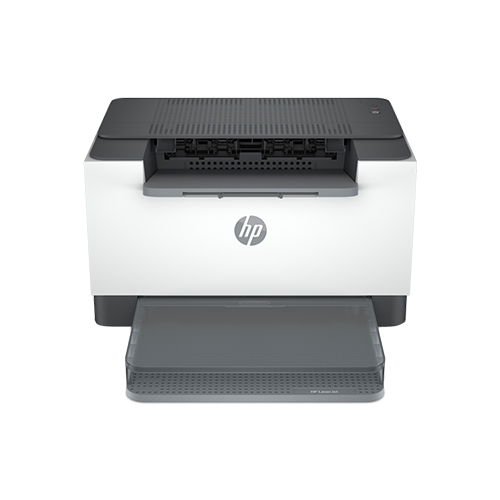

HP LaserJet M211dw Printer

Product details
HP LaserJet M211dw Printer details
HP LaserJet M211d Printer A high-productivity compact laser printer with the fastest two-sided printing in its class. Get a simple setup with the time-saving HP Smart app, , and intuitive controls.
This printer is intended to work only with cartridges that have a new or reused HP chip, and it uses dynamic security measures to block cartridges using a non-HP chip. Periodic firmware updates will maintain the effectiveness of these measures and block cartridges that previously worked. A reused HP chip enables the use of reused, remanufactured, and refilled cartridges. More at:
Help make a positive impact on the environment
This HP LaserJet meets Eco Label requirements, including ENERGY STAR® and BLUE ANGEL.
Help save energy with a LaserJet that uses up to 20% less energy than the
Help save energy with HP Auto-On/Auto-Off Technology – intelligence that can turn your printer on when you need it and off when you don’t.
The smart way to save time Get started fast with an easy you, step by step. Simply download the HP Smart app, connect a network, and share your printer across all your devices.
Get high-quality scanning, and share to Dropbox, Google Drive, email, or the cloud with the HP Smart app.
Trusted quality and convenience This surprisingly small laser delivers exceptional quality, page after page.
Easily manage tasks with smart-guided buttons for an intuitive experience – buttons appear only when needed.
Work fast. Work smart. Speed through with the fastest in-class two-sided printing speed.
You can fit this LaserJet almost anywhere – it’s that small and compact. Get projects done quickly with a printer that fits almost anywhere.
Get the business prints you want, fast. This printer delivers your documents at high speed.
Seamless setup Get high-quality scanning. Share to Dropbox, Google Drive, email, or the cloud – from virtually anywhere.
Amazing scanning, now on your smartphone Get high-quality scanning and share to Dropbox, Google Drive, email, or the cloud.
Printing just got more productive Quickly access and print documents and images, from Dropbox and Google Drive.
Small size. Big performance. A LaserJet is so compact it can fit almost anywhere.
Fastest in-class two-sided printing speed Speed through multipage documents with the fastest in-class two-sided printing speed.
Specifications
Functions Print
Print speed black (ISO, A4)Up to 29 ppm
Up to 18 pm
First page out black (A4, ready)As fast as 7 sec
Duty cycle (monthly, A4)Up to 20,000
Recommended monthly page volume200 to 2,000
Number of users1-5 users
Print technology laser
Print quality black (best)Up to 600 x 600 dpi
Processor speed500 MHz
Print languagesPCLmS; URF; PWG
Print colors No
Number of print cartridges1 (black)
Mac compatible Yes
Printer ManagementHP Printer Assistant (UDC); HP Device Toolbox
Security management Secure Boot, Secure Firmware Integrity, Runtime Code Integrity; Secure defaults, Encrypted data at rest
Mobile printing capabilityApple AirPrint™; HP Smart App
Shipping and Returns
Shipping cost is based on weight. Just add products to your cart and use the Shipping Calculator to see the shipping price.
We want you to be 100% satisfied with your purchase. Items can be returned or exchanged within 30 days of delivery.
There are no question found.
Quick Comparison
| HP LaserJet M211dw Printer remove | HP OfficeJet Pro 9123 All-in-One Printer (403W0C) remove | HP Colour LaserJet Pro M479fdw Printer remove | HP LaserJet Pro MFP 4103fdw Printer remove | HP Smart Tank 750 All-in-One (6UU47A) remove | HP Smart Tank 615 Wireless All-in-One (Y0F71A) remove | |||||||||
|---|---|---|---|---|---|---|---|---|---|---|---|---|---|---|
| Name | HP LaserJet M211dw Printer remove | HP OfficeJet Pro 9123 All-in-One Printer (403W0C) remove | HP Colour LaserJet Pro M479fdw Printer remove | HP LaserJet Pro MFP 4103fdw Printer remove | HP Smart Tank 750 All-in-One (6UU47A) remove | HP Smart Tank 615 Wireless All-in-One (Y0F71A) remove | ||||||||
| Image | |  |  |  |  |  | ||||||||
| SKU | ||||||||||||||
| Rating | ||||||||||||||
| Price | Original price was: ₦290,000.00.₦270,000.00Current price is: ₦270,000.00. Save 7% | ₦360,000.00 | ₦920,000.00 | ₦880,000.00 | Original price was: ₦470,000.00.₦455,000.00Current price is: ₦455,000.00. Save 3% | ₦416,000.00 | ||||||||
| Stock |
20 in stock
|
20 in stock
| ||||||||||||
| Availability | 20 in stock | 20 in stock | ||||||||||||
| Add to cart | ||||||||||||||
| Description |
| Orderable supplies
HP 936 Black Original Ink Cartridge 4S6V2LN, HP 936 Cyan Original Ink Cartridge 4S6U9LN; HP 936 Magenta Original Ink Cartridge 4S6V0LN; HP 936 Yellow Original Ink Cartridge 4S6V1LN; HP EvoMore planned to be available April 2024: HP 936e EvoMore Black Original Ink Cartridge 4S6V6LN; HP 936e EvoMore Cyan Original Ink Cartridge 4S6V3LN; HP 936e EvoMore Magenta Original Ink Cartridge 4S6V4LN; HP 936e EvoMore Yellow Original Ink Cartridge 4S6V5LN
Print Cartridges/Bottle, Number
4 (1 each black, cyan, magenta, yellow)
Print quality black (best)
Black: 1200 x 1200 rendered dpi Color: Up to 4800 x 1200 optimized dpi on HP Advance Photo Paper 1200 x 1200 dpi input
Recommended monthly page volume
Up to 1500
Print quality color (best)
Up to 4800 x 1200 optimized dpi on HP Advance Photo Paper 1200 x 1200 dpi input
Print technology
HP Thermal Inkjet
| Print Size: A4 / Functions: Print, Copy, Scan, Fax Print Speed: Up to 27 ppm Print Resolution: Up to 600 x 600 dpi Duplex Printing: Automatic (standard) Connectivity: Hi-Speed USB 2.0 port, host USB at rear side, Gigabit Ethernet, Wireless 802.11b/g/n 2.4/5 GHz Wi-Fi radio Paper Handling: 50 Sheet Multipurpose Tray, 250 Sheet Input Tray, 50 sheet Automatic Document Feeder |
| Functions
Print, Scan, Copy, ADF, Wireless
Multitasking supported
No
Print speed black (ISO, A4)
Up to 15 ppm
Recommended monthly page volume
400 to 800 HP recommends that the number of pages per month of imaged output be within the stated range for optimum device performance, based on factors including supplies replacement intervals and device life over an extended warranty period.
Print technology
HP Thermal Inkjet
Printer drivers included
HP PCL 3 GUI
| Functions
Print, copy, scan, fax, ADF, wireless
Multitasking supported
No
Print speed black (ISO, A4)
Up to 11 ppm
Recommended monthly page volume
400 to 800
Print technology
HP Thermal Inkjet
Printer drivers included
HP PCL 3 GUI
| ||||||||
| Content | HP LaserJet M211dw Printer detailsHP LaserJet M211d Printer A high-productivity compact laser printer with the fastest two-sided printing in its class. Get a simple setup with the time-saving HP Smart app, , and intuitive controls. This printer is intended to work only with cartridges that have a new or reused HP chip, and it uses dynamic security measures to block cartridges using a non-HP chip. Periodic firmware updates will maintain the effectiveness of these measures and block cartridges that previously worked. A reused HP chip enables the use of reused, remanufactured, and refilled cartridges. More at: Help make a positive impact on the environment This HP LaserJet meets Eco Label requirements, including ENERGY STAR® and BLUE ANGEL. Help save energy with a LaserJet that uses up to 20% less energy than the Help save energy with HP Auto-On/Auto-Off Technology – intelligence that can turn your printer on when you need it and off when you don’t. The smart way to save time Get started fast with an easy you, step by step. Simply download the HP Smart app, connect a network, and share your printer across all your devices. Get high-quality scanning, and share to Dropbox, Google Drive, email, or the cloud with the HP Smart app. Trusted quality and convenience This surprisingly small laser delivers exceptional quality, page after page. Easily manage tasks with smart-guided buttons for an intuitive experience – buttons appear only when needed. Work fast. Work smart. Speed through with the fastest in-class two-sided printing speed. You can fit this LaserJet almost anywhere – it’s that small and compact. Get projects done quickly with a printer that fits almost anywhere. Get the business prints you want, fast. This printer delivers your documents at high speed. Seamless setup Get high-quality scanning. Share to Dropbox, Google Drive, email, or the cloud – from virtually anywhere. Amazing scanning, now on your smartphone Get high-quality scanning and share to Dropbox, Google Drive, email, or the cloud. Printing just got more productive Quickly access and print documents and images, from Dropbox and Google Drive. Small size. Big performance. A LaserJet is so compact it can fit almost anywhere. Fastest in-class two-sided printing speed Speed through multipage documents with the fastest in-class two-sided printing speed.SpecificationsFunctions Print Print speed black (ISO, A4)Up to 29 ppm Up to 18 pm First page out black (A4, ready)As fast as 7 sec Duty cycle (monthly, A4)Up to 20,000 Recommended monthly page volume200 to 2,000 Number of users1-5 users Print technology laser Print quality black (best)Up to 600 x 600 dpi Processor speed500 MHz Print languagesPCLmS; URF; PWG Print colors No Number of print cartridges1 (black) Mac compatible Yes Printer ManagementHP Printer Assistant (UDC); HP Device Toolbox Security management Secure Boot, Secure Firmware Integrity, Runtime Code Integrity; Secure defaults, Encrypted data at rest Mobile printing capabilityApple AirPrint™; HP Smart App | Orderable supplies
HP 936 Black Original Ink Cartridge 4S6V2LN, HP 936 Cyan Original Ink Cartridge 4S6U9LN; HP 936 Magenta Original Ink Cartridge 4S6V0LN; HP 936 Yellow Original Ink Cartridge 4S6V1LN; HP EvoMore planned to be available April 2024: HP 936e EvoMore Black Original Ink Cartridge 4S6V6LN; HP 936e EvoMore Cyan Original Ink Cartridge 4S6V3LN; HP 936e EvoMore Magenta Original Ink Cartridge 4S6V4LN; HP 936e EvoMore Yellow Original Ink Cartridge 4S6V5LN
Print Cartridges/Bottle, Number
4 (1 each black, cyan, magenta, yellow)
Print quality black (best)
Black: 1200 x 1200 rendered dpi Color: Up to 4800 x 1200 optimized dpi on HP Advance Photo Paper 1200 x 1200 dpi input
Recommended monthly page volume
Up to 1500
Print quality color (best)
Up to 4800 x 1200 optimized dpi on HP Advance Photo Paper 1200 x 1200 dpi input
Print technology
HP Thermal Inkjet
Printer drivers included
Windows HP Driver (Pcl3), Linux, UNIX, SAP
Display
2.7" (6.86 cm) Capacitive Touchscreen CGD
Processor speed
1.2 GHz
Print languages
HP PCL3 GUI
Paper handling input, standard
250-sheet input tray; 35-sheet ADF
Paper handling output, standard
60-sheet output tray
Duplex printing
Automatic
Maximum Input Capacity (envelopes)
Up to 30 envelopes
Borderless printing
Yes, on photo paper only, up to 8.5 x 11 in (US letter), 210 x 297 mm (A4)
Media types
Plain Paper, HP Photo Papers, HP Matte Brochure or Professional Paper, HP Matte Presentation Paper, HP Glossy Brochure or Professional Paper, Other Photo Inkjet Papers, Other Matte Inkjet Papers, Other Glossy Inkjet Papers, Thick Plain Paper, Light/Recycled Plain Paper, HP Tri-fold Brochure Paper, Glossy
Mobile printing capability
Chrome OS; HP Smart app; Apple AirPrint™; Wi-Fi® Direct Printing; Mopria™ Certified [4]
Wireless capability
Yes, with built-in dual-band Wi-Fi 802.11 a/b/g/n/ac and a self-heal solution
Connectivity, standard
1 Ethernet; 1 Hi-Speed USB 2.0 (device); 1 Hi-Speed USB 2.0 (host); 1 Wi-Fi 802.11 a/b/g/n/ac (dual band); 2 RJ-11 Fax/Modem port/phone line
Minimum System Requirements
Microsoft® Windows® 11, 10: 32-bit or 64-bit, 2 GB available hard disk space, Internet connection, Microsoft® Internet Explorer or Edge,
Minimum System Requirements for Macintosh
macOS 11 BigSur, macOS 12 Monterey, macOS 13 Ventura, 2 GB HD, Internet Required
Compatible operating systems
Windows 11; Windows 10; Windows Server; macOS 11 Big Sur; macOS 12 Monterey; macOS 13 Ventura; macOS 14 Sonoma; Linux; Chrome OS Windows Server 2016 64-bit, Windows Server 2019 64-bit, Windows Server 2022 64-bit, linux (for more information see http://developers.hp.com/hp-linux-imaging-and-printing)
Memory, standard
512 MB None
Maximum Memory
512 MB
Quantity per pallet
NA/EMEA/AP: 35; LA: 42
Count of layers in pallet
NA/EMEA/AP: 5; LA: 6
What's in the box
NA: HP OfficeJet Pro 9120 AiO Printer;HP 936 Setup Black Ink Cartridge; HP 936 Setup Cyan Ink Cartridge; HP 936 Setup Magenta Ink Cartridge; HP 936 Setup Yellow Ink Cartridge; Regulatory Flyer; Ink Caution Flyer; Power Cord; Setup Poster; Reference Guide [For more information about fill and yield, see http://www.hp.com/go/learnaboutsupplies ] EMEA/APJ:HP OfficeJet Pro 9120 AiO Printer; HP 937 Setup Black Ink Cartridge; HP 937 Setup Cyan Ink Cartridge; HP 937 Setup Magenta Ink Cartridge; HP 937 Setup Yellow Ink Cartridge; Regulatory Flyer; Ink Caution Flyer; Power Cord; Setup Poster; Reference Guide [For more information about fill and yield, see http://www.hp.com/go/learnaboutsupplies ] LAR/APJ: HP OfficeJet Pro 9120 AiO Printer; HP 938 Setup Black Ink Cartridge; HP 938 Setup Cyan Ink Cartridge; HP 938 Setup Magenta Ink Cartridge; HP 938 Setup Yellow Ink Cartridge; Regulatory Flyer; Ink Caution Flyer; Power Cord; Setup Poster; Reference Guide [For more information about fill and yield, see http://www.hp.com/go/learnaboutsupplies ]
Cable included
No, please purchase USB cable separately
Manufacturer Warranty
One-Year limited hardware warranty. For more information, please visit us at http://support.hp.com. (9)
Tech spec footnote
[1] Dimensions vary as per configuration
Tech spec footnote
[2] Weight varies as per configuration
Tech spec footnote
[3] Power requirements are based on the country/region where the printer is sold. Do not convert operating voltages. This will damage the printer and void the product warranty.
Tech spec footnote
[4] Wireless performance is dependent upon physical environment and distance from the access point. Wireless operations are compatible with 2.4 GHz routers only; excludes wireless direct. Wireless direct may require driver or apps be installed and connected on wireless-enabled mobile device or PC. Wireless functionality may vary by computer and mobile operating systems, see hpconnected.com. Separately purchased data plans or usage fees may apply. Print times and connection speeds may vary. AirPrint supports OS X® Lion, OS X® Mountain Lion and the following devices running iOS 4.2 or later: iPad®, iPhone® (3GS or later), iPod touch® (3rd generation or later) and requires the printer be connected to the same network as your OS X or iOS device. AirPrint, the AirPrint Logo, iPad, iPhone, and iPod touch are trademarks of Apple® Inc. Windows is a trademark of the Microsoft group of companies. BlackBerry® names and logos are the property of Research In Motion Limited. Android is a trademark of Google Inc.
Tech spec footnote
[5] Speed specifications have been updated to reflect current industry testing methods.
Tech spec footnote
[6] Either after first page or after first set of ISO test pages. For details see http://www.hp.com/go/printerclaims
Tech spec footnote
[7] HP recommends that the number of printed pages per month be within the stated range for optimum device performance, based on factors including supplies replacement
Tech spec footnote
[8] For full terms and conditions visit: www.hp.com/go/orderdocuments . Warranty and support options vary by product, country, and local legal requirements.
| Product Specifications HP Colour LaserJet Pro MFP M479fdw Printer (W1A80A) - Print Size: A4, Functions: Print, Copy, Scan, Fax, Print Speed: Up to 27ppm mono, Print Resolution: Up to 600 x 600 dpi, Duplex Printing: Automatic (default), Memory: 512MB NAND Flash, 512MB DRAM, Connectivity: 1 x Hi-Speed USB 2.0 port, 1 x host USB at rear side, 1 x Gigabit Ethernet, 1 x Wireless 802.11b/g/n 2.4/5 GHz Wi-Fi radio, Paper Handling: 50 Sheet Multipurpose Tray, 250 Sheet Input Tray, 50 sheet Automatic Document Feeder, 4.3 inch intuitive colour touchscreen, Apple AirPrint, Google Cloud Print, HP ePrint, HP Smart App, Mobile Apps, Mopria Certified, Wi-Fi Direct Printing, Roam capable for easy printing In the Box HP Colour LaserJet Pro MFP M479fdw Printer (W1A80A), Black/Cyan/Yellow/Magenta Introductory Toner Cartridges, Regulatory flyer (CD replacement), Unpack flyer, Installation guide, Power cord, Warranty cards. No USB cable included, please purchase separately | Support your dynamic workteam with this high-speed smart printer, ideal for up to 10 users. HP Pro-class print speed Step up your workflow. HP Pro-class print speed reaches up to 42 ppm to meet high-demand environments. Dual-sided scanning. Scan both sides with a single pass. Dual-sided scanning allows your users to get more done in less time. Large workteam solution. Support your dynamic workteam with this high-speed smart printer, ideal for up to 10 users. HP Pro-class print speed Step up your workflow. HP Pro-class print speed reaches up to 42 ppm to meet high-demand environments. Dual-sided scanning. Scan both sides with a single pass. Dual-sided scanning allows your users to get more done in less time. Walk-up USB No PC or driver required. Print or scan on the spot from your USB drive. HP Smart. Get productivity in the palm of your hand. Print, scan, and save time with Shortcuts from HP Smart. Cloud connection Connect your HP printers. Robust features and smart tools help your people do more, wherever work happens. Smart Admin Access your printers from a single dashboard. Smart Admin guides you through setup and gives IT visibility. Self-heal Wi-Fi®. Help protect your printer. Self-heal Wi-Fi® detects anomalies and reboots automatically to prior safe state. Out-of-the-box secure. Get printer security out of the box. Preconfigured settings mean it's ready when you are. | Functions
Print, Scan, Copy, ADF, Wireless
Multitasking supported
No
Print speed black (ISO, A4)
Up to 15 ppm
Recommended monthly page volume
400 to 800 HP recommends that the number of pages per month of imaged output be within the stated range for optimum device performance, based on factors including supplies replacement intervals and device life over an extended warranty period.
Print technology
HP Thermal Inkjet
Printer drivers included
HP PCL 3 GUI
Print quality black (best)
Black: Up to 1200 x 1200 rendered dpi Color: Up to 4800 x 1200 optimized dpi color when printing from a computer and 1200 inp ut dpi
Display
Twisted Pneumatic Positive, Reflective, LCD 2 x 0.4 in (50.8 x 10.16 mm)
Processor speed
800 MHz
Print Cartridges/Bottle, Number
4 (1 each black bottle, set of 3 color bottles)
Print languages
HP PCL 3 GUI
Automatic paper sensor
Yes
Wireless capability
Yes, 2.4/5G dual band Wi-Fi, Wi-Fi Direct
Connectivity, standard
Hi-Speed USB 2.0; Wi-Fi; LAN
Minimum system requirements
Windows 10, 7: 32-bit or 64-bit, 2 GB available hard disk space, Internet connection, Internet Explorer. macOS v10.14 Mojave, macOS v10.15 Catalina, macOS v11 Big Sur; 2 GB HD; Internet required
Compatible operating systems
Windows 11; Windows 10; Windows 7; macOS 10.14 Mojave; macOS 10.15 Catalina; macOS 11 Big Sur; macOS 12 Monterey; macOS 13 Ventura; macOS 14 Sonoma Windows 10, 7: 32-bit or 64-bit, 2 GB available hard disk space, Internet connection, Internet Explorer; macOS v10.14 Mojave, macOS v10.15 Catalina, macOS v11 Big Sur; 2 GB HD; Internet required
Mobile printing capability
Apple AirPrint; Mopria certified; HP Print Service Plugin (Android printing); HP Smart app; Wi-Fi Direct Printing [3]
Maximum Memory
256 MB
Paper handling input, standard
250-sheet input tray
Paper handling output, standard
100-sheet output tray
Duplex printing
Automatic
Media types
Plain Paper, HP Photo Papers, HP Matte Brochure or Professional Paper, HP Matte Presentation Paper, HP Glossy Brochure or Professional Paper, Other Photo Inkjet Papers, Other Matte Inkjet Papers, Other Glossy Inkjet Papers, Plain Paper, Light/Recycled
Borderless printing
Yes (up to 8.5 x 11 in, 210 x 297 mm)
Scanner type
Flatbed, ADF
Scan file format
JPG; PDF; PNG; TIFF
Scan resolution, optical
Up to 1200 dpi
Bit depth
24-bit
Automatic document feeder capacity
Standard, 35 sheets
File Format Supported
PDF; BMP; PNG; TIF; JPG
Scan input modes
Front Panel Copy; HP Software; EWS
Copy resolution (black text)
Up to 600 dpi
Copy resolution (color text and graphics)
Up to 600 x 600 dpi
Copy reduce / enlarge settings
25 to 400%
Copies, maximum
Up to 99 copies
Power
Input voltage: 100 to 240 VAC (+/- 10%), 50/60 Hz (+/- 3 Hz)
Power consumption
0.1 watts (off);1.10 watts (sleep) [2]
Sustainable impact specifications
25% post-consumer recycled plastic; Recyclable through HP Planet Partners
Quantity per pallet
48
Count of layers in pallet
6
Software included
HP Printer Software, available online
Tech spec footnote
[1] Dimensions vary as per configuration
Tech spec footnote
[2] Power requirements are based on the country/region where the printer is sold. Do not convert operating voltages. This will damage the printer and void the product warranty.
Tech spec footnote
[3] Wireless performance is dependent upon physical environment and distance from the access point. Wireless operations are compatible with 2.4 and 5 GHz routers only; excludes wireless direct. Wireless direct may require driver or apps be installed and connected on wireless-enabled mobile device or PC. Wireless functionality may vary by computer and mobile operating systems, see http://hpconnected.com . Print times and connection speeds may vary. Apple, AirPrint, Mac, and macOS are trademarks of Apple Inc., registered in the U.S. and other countries. Use of the Works with Apple badge means that an accessory has been designed to work specifically with the technology identified in the badge and has been certified by the developer to meet Apple performance standards. Windows is a trademark of the Microsoft group of companies. Mopria®, the Mopria® Logo, and the Mopria Alliance™ word mark and logo are registered and/or unregistered trademarks and service marks of Mopria Alliance, Inc. in the United States and other countries. Unauthorized use is strictly prohibited
Tech spec footnote
[4] Speed specifications have been updated to reflect current industry testing methods.
Tech spec footnote
[5] Either after first page or after first set of ISO test pages. For details see: http://hp.com/go/printerclaims
Tech spec footnote
[6] Average based on ISO/IEC 24711 or HP testing methodology and continuous printing. Actual yield varies considerably based on content of printed pages and other factors. For details see http://hp.com/go/learnaboutsupplies
Tech spec footnote
[7] Based on HP internal A4 Memo draft document methodology. For details see https://h20195.www2.hp.com/v2/GetDocument.aspx?docname=4AA8-4168ENW .
Tech spec footnote
[10] Program availability varies. For details, see http://www.hp.com/recycle.
Tech spec footnote
[11] Post-consumer recycled is based on the definition set in the EPEAT standard for imaging equipment, IEEE 1680.2, and is expressed as percent of total weight of plastic.
| Functions
Print, copy, scan, fax, ADF, wireless
Multitasking supported
No
Print speed black (ISO, A4)
Up to 11 ppm
Recommended monthly page volume
400 to 800
Print technology
HP Thermal Inkjet
Printer drivers included
HP PCL 3 GUI
Print quality black (best)
Black: Up to 1200 x 1200 rendered dpi Color: Up to 4800 x 1200 optimized dpi color (when printing from a computer and 1200 input dpi)
Display
2.2-inch Touchscreen MGD (Mono graphics)
Processor speed
800 MHz
Print Cartridges/Bottle, Number
4 (1 each black bottle, set of 3 color bottles)
Print languages
HP PCL 3 GUI
Automatic paper sensor
No
Wireless capability
Yes, built-in self-healing dual band Wi-Fi 802.11b/g/n, Wireless direct
Connectivity, standard
1 Wi-Fi Direct; 2 Hi-Speed USB 2.0 (device)
Connectivity, optional
None
Minimum system requirements
Windows 10, 8.1, 8, 7: 32-bit or 64-bit, 2 GB available hard disk space, Internet connection, USB port, Internet Explorer. OS X v10.11 El Capitan and above, Internet Access
Compatible operating systems
Windows 11; Windows 10; Windows 8; Windows 8.1; Windows 7; macOS 10.11 El Capitan; macOS 10.12 Sierra; macOS 10.13 High Sierra; macOS 10.14 Mojave; macOS 13 Ventura; macOS 14 Sonoma macOS 14 Sonoma; Windows 11; Windows 10; Windows 8; Windows 8.1; Windows 7; macOS 10.11 El Capitan; macOS 10.12 Sierra; macOS 10.13 High Sierra; macOS 10.14 Mojave; macOS 13 Ventura.
Mobile printing capability
Apple AirPrint; Mopria Print Service; HP Print Service Plugin (Android printing); Google Cloud Print™; Wi-Fi Direct Printing [3]
Maximum Memory
256 MB
Paper handling input, standard
100-sheet input tray
Paper handling output, standard
30-sheet output tray
Duplex printing
Manual (driver support provided)
Media types
Plain paper, Matte Brochure Papers, Glossy Brochure Papers, Photo papers, Envelopes, Other specialty inkjet papers
Borderless printing
Yes (up to 8.5 x 11 in, 210 x 297 mm)
Scanner type
Flatbed, ADF (optional)
Scan file format
JPEG, TIFF, PDF, BMP, PNG
Scan resolution, optical
Up to 1200 dpi
Bit depth
24-bit
Automatic document feeder capacity
Standard, Up to 35 sheets
Digital sending standard features
Everyday scan (scan to PDF); HP Smart Tasks
File Format Supported
BMP; PDF; JPG; PNG; TIF
Scan input modes
Front Panel Scan; Copy; Fax; HP Software; EWS
Copy speed (draft)
Black: Up to 22 cpm Color: Up to 14 cpm [4]
Copy resolution (black text)
Up to 600 dpi
Copy resolution (color text and graphics)
Up to 600 dpi
Copy reduce / enlarge settings
fit to page
Copies, maximum
Up to 99 copies
Faxing
Yes, color
Fax Resolution Black (best)
Up to 300 x 300 dpi
Fax Speed Dials, Maximum Number
Up to 99 numbers
Fax Broadcast Locations
20
Power
Input voltage 100 to 240 VAC (+/- 10%), 50/60 Hz (+/- 3 Hz). High voltage: Input voltage 200 to 240 VAC (+/- 10%), 50/60 Hz (+/- 3Hz). Not dual voltage, power supply varies by part number with # Option code identifier.
Power consumption
0.11 watts (manual-off), 3.82 watts (ready), 0.71 watt (sleep) [2]
Sustainable impact specifications
No
Quantity per pallet
50
Count of layers in pallet
5
What's in the box
HP Smart Tank Plus 615; HP GT53XL 135-ml Black Original Ink Bottle; HP GT52 Cyan Original Ink Bottle; HP GT52 Magenta Original Ink Bottle; HP GT52 Yellow Original Ink Bottle; Ink caution flyer; Repacking flyer; Setup guide; Reference guide; Regulatory flyer; China warranty card; China 3G card; QQ-Wechat flyer Power cord [For more information about fill and yield, see http://www.hp.com/go/learnaboutsupplies]
Cable included
WW: No, please purchase (USB) cable separately; AP: Yes, 1.5 m (USB) cable (except Taiwan, Hong Kong and Singapore)
Software included
HP Printer Software, HP Update, HP Photo Creations
Manufacturer Warranty
One year of 24/7 world-class technical support services through http://www.hp.com/support; One-year or 30,000 pages limited hardware warranty, whichever is earlier from the date of purchase; user replaceable parts have separate warranty periods
Tech spec footnote
[1] Dimensions vary as per configuration
Tech spec footnote
[2] Power requirements are based on the country/region where the printer is sold. Do not convert operating voltages. This will damage the printer and void the product warranty.
Tech spec footnote
[3] Wireless performance is dependent upon physical environment and distance from the access point. Wireless operations are compatible with 2.4 GHz routers only; excludes wireless direct. Wireless direct may require driver or apps be installed and connected on wireless-enabled mobile device or PC. Wireless functionality may vary by computer and mobile operating systems, see http://hpconnected.com. Print times and connection speeds may vary. AirPrint™ supports macOS Mojave, iOS 4.2 or later and requires the printer be connected to the same network as your macOS or iOS device. AirPrint, the AirPrint Logo and macOS are trademarks of Apple Inc. Windows is a trademark of the Microsoft group of companies.
Tech spec footnote
[4] Speed specifications have been updated to reflect current industry testing methods.
Tech spec footnote
[5] Either after first page or after first set of ISO test pages. For details see: http://hp.com/go/printerclaims
Tech spec footnote
[6] Average based on ISO/IEC 24711 or HP testing methodology and continuous printing. Actual yield varies considerably based on content of printed pages and other factors. For details see http://hp.com/go/learnaboutsupplies
Tech spec footnote
[7] Based on HP internal A4 Memo draft document methodology. For details see https://h20195.www2.hp.com/v2/GetDocument.aspx?docname=4AA8-4168ENW .
| ||||||||
| Weight | 6 kg | N/A | 24 kg | 12.7 kg | 9 kg | N/A | ||||||||
| Dimensions | N/A | N/A | N/A | N/A | N/A | N/A | ||||||||
| Additional information |
|
|
|
| ||||||||||
| Sold | 0 | 0 | 0 | 0 | 0 | 0 | ||||||||
| Shipping |




Rating & Review
There are no reviews yet.