


HP DeskJet Plus Ink Advantage 6075 All-in-One Printer

Product details
HIGHLY AFFORDABLE WIFI PRINTER FOR YOUR PRINT, SCAN AND COPY NEEDS
· QUICK MOBILE SETUP WITH HP SMART APP: Fast and easy printer setup that guides you, step by step; simply download the HP Smart app, connect to Wi-Fi, and share the inkjet printer across all your device
· WORRY FREE DUAL BAND WIRELESS: Get better range, faster and more reliable connections using dual-band Wi-Fi with self-healing
· RELIABLE CONNECTIVITY: High-speed USB 2.0 Connectivity, Wi-Fi
· PRINT AUTOMATICALLY ON BOTH SIDES: Save time and paper with automatic two-sided printing (Duplex Printing)
· BORDERLESS PHOTOS: This wireless printer lets you print borderless photos and documents at home
· PRINT & SCAN ON THE GO: Print, scan, and copy from virtually anywhere with your smartphone, and share your documents to third-party software like Dropbox and Google Drive using the HP Smart app
· SAVE YOUR PRODUCTIVE TIME: High speed printing for home needs; Black: Up to 10 ppm (ISO); Color: Up to 7 ppm (ISO)
· VERSATILE PRINT/MEDIA OPTIONS: Supports A4; B5; A6; DL envelope
· PEACE OF MIND SERVICE SUPPORT: HP ON-SITE 1-YEAR WARRANTY (Use genuine HP 682 Black Original Ink Cartridge 682 Tri-Color Original Ink Cartridge)
Shipping and Returns
Shipping cost is based on weight. Just add products to your cart and use the Shipping Calculator to see the shipping price.
We want you to be 100% satisfied with your purchase. Items can be returned or exchanged within 30 days of delivery.
HP
There are no question found.
Quick Comparison
| HP DeskJet Plus Ink Advantage 6075 All-in-One Printer remove | SHARP BP-30M31 Multifunctional Monochrome Printer remove | HP OfficeJet Pro 9730 Wide Format All-in-One Printer (537P5C) remove | HP Colour Laser 150a Printer remove | HP Smart Tank 670 All-in-One (6UU48A) remove | HP Colour LaserJet Pro MFP M183fw Printer remove | |||||||||||
|---|---|---|---|---|---|---|---|---|---|---|---|---|---|---|---|---|
| Name | HP DeskJet Plus Ink Advantage 6075 All-in-One Printer remove | SHARP BP-30M31 Multifunctional Monochrome Printer remove | HP OfficeJet Pro 9730 Wide Format All-in-One Printer (537P5C) remove | HP Colour Laser 150a Printer remove | HP Smart Tank 670 All-in-One (6UU48A) remove | HP Colour LaserJet Pro MFP M183fw Printer remove | ||||||||||
| Image | |  |  | 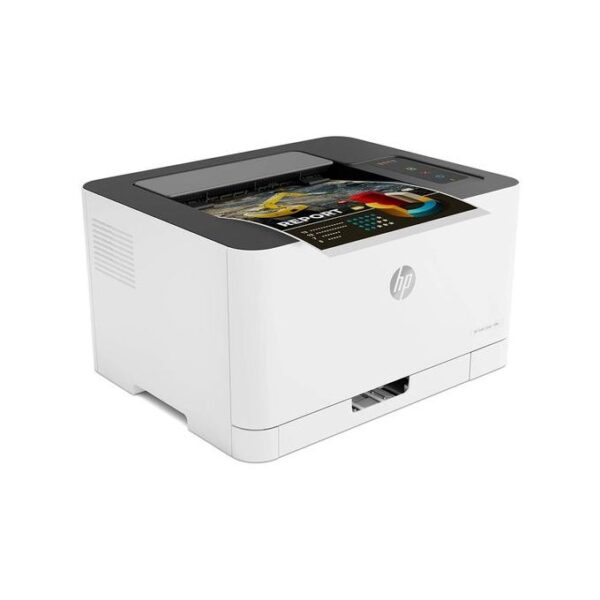 |  | 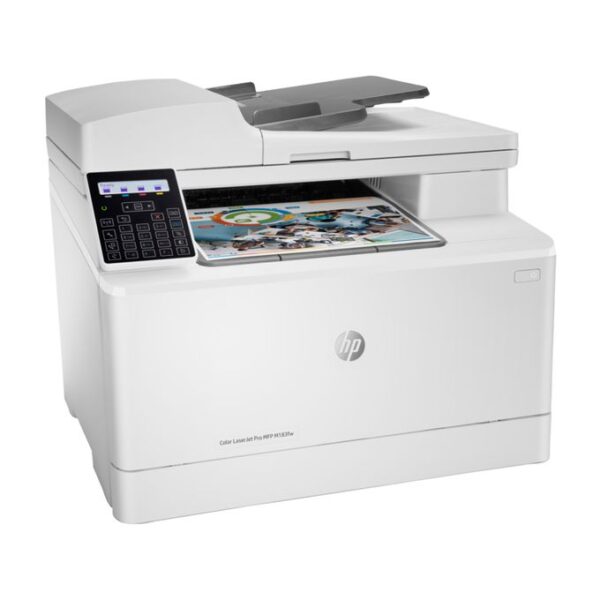 | ||||||||||
| SKU | ||||||||||||||||
| Rating | ||||||||||||||||
| Price | ₦178,000.00 | ₦4,590,000.00 | ₦415,000.00 | ₦436,000.00 | ₦397,000.00 | ₦640,000.00 | ||||||||||
| Stock |
20 in stock
|
20 in stock
| ||||||||||||||
| Availability | 20 in stock | 20 in stock | ||||||||||||||
| Add to cart | ||||||||||||||||
| Description |
| Key Features
| Orderable supplies
HP 936 Black Original Ink Cartridge 4S6V2LN, HP 936 Cyan Original Ink Cartridge 4S6U9LN; HP 936 Magenta Original Ink Cartridge 4S6V0LN; HP 936 Yellow Original Ink Cartridge 4S6V1LN; HP EvoMore planned to be available April 2024: HP 936e EvoMore Black Original Ink Cartridge 4S6V6LN; HP 936e EvoMore Cyan Original Ink Cartridge 4S6V3LN; HP 936e EvoMore Magenta Original Ink Cartridge 4S6V4LN; HP 936e EvoMore Yellow Original Ink Cartridge 4S6V5LN
Print Cartridges/Bottle, Number
4 (1 each black, cyan, magenta, yellow)
Print quality black (best)
Black: Up to 1200 x 1200 rendered dpi Color: Up to 4800 by 1200 optimized dpi on HP Advance Photo Paper 1200 by 1200 dpi input
Recommended monthly page volume
250 to 1500 [5] HP recommends that the number of printed pages per month be within the stated range for optimum device performance, based on factors including supplies replacement intervals and device life over an extended warranty period.
Print quality color (best)
Up to 4800 by 1200 optimized dpi on HP Advance Photo Paper 1200 by 1200 dpi input
Print technology
HP Thermal Inkjet
|
| Functions
Print, Scan, Copy, Wireless
Multitasking supported
No
Print speed black (ISO, A4)
Up to 12 ppm
Recommended monthly page volume
400 to 800 HP recommends that the number of pages per month of imaged output be within the stated range for optimum device performance, based on factors including supplies replacement intervals and device life over an extended warranty period.
Print technology
HP Thermal Inkjet
Printer drivers included
HP PCL 3 GUI
|
| ||||||||||
| Content | HIGHLY AFFORDABLE WIFI PRINTER FOR YOUR PRINT, SCAN AND COPY NEEDS · QUICK MOBILE SETUP WITH HP SMART APP: Fast and easy printer setup that guides you, step by step; simply download the HP Smart app, connect to Wi-Fi, and share the inkjet printer across all your device · WORRY FREE DUAL BAND WIRELESS: Get better range, faster and more reliable connections using dual-band Wi-Fi with self-healing · RELIABLE CONNECTIVITY: High-speed USB 2.0 Connectivity, Wi-Fi · PRINT AUTOMATICALLY ON BOTH SIDES: Save time and paper with automatic two-sided printing (Duplex Printing) · BORDERLESS PHOTOS: This wireless printer lets you print borderless photos and documents at home · PRINT & SCAN ON THE GO: Print, scan, and copy from virtually anywhere with your smartphone, and share your documents to third-party software like Dropbox and Google Drive using the HP Smart app · SAVE YOUR PRODUCTIVE TIME: High speed printing for home needs; Black: Up to 10 ppm (ISO); Color: Up to 7 ppm (ISO) · VERSATILE PRINT/MEDIA OPTIONS: Supports A4; B5; A6; DL envelope · PEACE OF MIND SERVICE SUPPORT: HP ON-SITE 1-YEAR WARRANTY (Use genuine HP 682 Black Original Ink Cartridge 682 Tri-Color Original Ink Cartridge) | The BP-30M31 A3 black & white device is ideal for any busy workgroup that needs high performance, high quality output and versatility; with the options and upgrades on offer making it adaptable to your future needs. It comes with a range of robust security features to keep your data and network safe including access control, data encryption and S/MIME as well as a self-healing firmware system, SSL certificate validation and a programme execution white list.<br 'source="" sans="" pro',="" sans-serif";="" font-size:="" 16px;"=""><br 'source="" sans="" pro',="" sans-serif";="" font-size:="" 16px;"="">Support for a secondary LAN (optional) provides simultaneous support for two networks whilst the Print Release function allows users to send and store documents to a main MFP, which acts as a server, allowing print jobs to be securely released at up to five connected, network-ready devices. Optional workflow enhancing features include Single-Sign-On cloud connectivity, mobile connectivity via Wi-Fi, NFC or QR Code, USB direct printing of MS Office files and OCR for scan to searchable PDF/Office.<br 'source="" sans="" pro',="" sans-serif";="" font-size:="" 16px;"=""><br 'source="" sans="" pro',="" sans-serif";="" font-size:="" 16px;"="">A 7.0-inch colour LCD touchscreen provides the ability to drag and drop frequently used icons for simple customisation of the home screen and status lamps show the MFP's status from a distance. Everyday operation is simple and intuitive; just touch, tap, pinch and spread or swipe for instant access to every feature, function and setting including an advanced preview feature.<br 'source="" sans="" pro',="" sans-serif";="" font-size:="" 16px;"=""><br 'source="" sans="" pro',="" sans-serif";="" font-size:="" 16px;"="">Print and copy speeds of up to 31 ppm in black & white and a built-in 100-sheet Reversing Single Pass Feeder with a scan speed of up to 60 ipm (one-sided, colour and black & white) help to boost efficiency and productivity. The BP-30M31 provides page after page of consistently high quality 600 x 600 dpi print resolution. A maximum paper capacity of 2,100 sheets and support for a wide range of media (up to A3 and 200 gsm) enable this device to handle varied output requirements with ease. And a space saving inner finisher (optional) automates document sorting and stapling.<br 'source="" sans="" pro',="" sans-serif";="" font-size:="" 16px;"=""><br 'source="" sans="" pro',="" sans-serif";="" font-size:="" 16px;"="">The Sharp Application Portal makes the MFP much more adaptable by providing software updates and cloud connector apps that enable agile working.<br 'source="" sans="" pro',="" sans-serif";="" font-size:="" 16px;"=""><br 'source="" sans="" pro',="" sans-serif";="" font-size:="" 16px;"="">The BP-30M31 uses Sharp's latest energy-saving technology. A rapid warm up time, low power consumption and low TEC value all aim to save money and support your environmental objectives.
Key Features
| Orderable supplies
HP 936 Black Original Ink Cartridge 4S6V2LN, HP 936 Cyan Original Ink Cartridge 4S6U9LN; HP 936 Magenta Original Ink Cartridge 4S6V0LN; HP 936 Yellow Original Ink Cartridge 4S6V1LN; HP EvoMore planned to be available April 2024: HP 936e EvoMore Black Original Ink Cartridge 4S6V6LN; HP 936e EvoMore Cyan Original Ink Cartridge 4S6V3LN; HP 936e EvoMore Magenta Original Ink Cartridge 4S6V4LN; HP 936e EvoMore Yellow Original Ink Cartridge 4S6V5LN
Print Cartridges/Bottle, Number
4 (1 each black, cyan, magenta, yellow)
Print quality black (best)
Black: Up to 1200 x 1200 rendered dpi Color: Up to 4800 by 1200 optimized dpi on HP Advance Photo Paper 1200 by 1200 dpi input
Recommended monthly page volume
250 to 1500 [5] HP recommends that the number of printed pages per month be within the stated range for optimum device performance, based on factors including supplies replacement intervals and device life over an extended warranty period.
Print quality color (best)
Up to 4800 by 1200 optimized dpi on HP Advance Photo Paper 1200 by 1200 dpi input
Print technology
HP Thermal Inkjet
Printer drivers included
HP PCL 3 GUI, HP PCL 3 Enhanced
Display
4.3" LCD (color) with Cap Sense touchscreen function
Processor speed
1.2 GHz
Print languages
HP PCL 3 GUI, HP PCL 3 Enhanced
Paper handling input, standard
250-sheet input tray, 250-sheet plain paper tray,
Paper handling input, optional
No
Paper handling output, standard
75-sheet output tray
Duplex printing
Automatic
Maximum Input Capacity (envelopes)
Up to 30 envelopes
Borderless printing
Yes (up to A3/11 x 17-in)
Media types
Plain; HP EcoFFICIENT; HP Premium Presentation Matte 120g; HP Tri-fold Brochure Glossy 180g; HP Brochure Matte 180g; HP Brochure Glossy 180g; HP Advanced Photo Papers; Light 60-74g
Mobile printing capability
Chrome OS; HP Smart app; Apple AirPrint™; Mobile Apps; Wi-Fi® Direct Printing; Mopria™ Certified [6]
Wireless capability
Yes, with built-in dual-band Wi-Fi 802.11 a/b/g/n/ac and a self-heal solution
Connectivity, standard
1 Ethernet; 1 Hi-Speed USB 2.0 (device); 1 Hi-Speed USB 2.0 (host); 1 Wi-Fi 802.11 a/b/g/n/ac (dual band)
Minimum System Requirements
Microsoft® Windows® 11, 10: 32-bit or 64-bit; 2 GB available hard disk space; Internet connection; Microsoft® Internet Explorer or Edge
Minimum System Requirements for Macintosh
Apple® macOS v11 Big Sur, macOS v12 Monterey, macOS v13 Ventura; 2 GB HD; Internet required
Compatible operating systems
Windows 11; Windows 10; macOS 11 Big Sur; macOS 12 Monterey; macOS 13 Ventura; macOS 14 Sonoma; Linux; Chrome OS [4] Windows Server 2016 64-bit, Windows Server 2019 64-bit, Windows Server 2022 64-bit; Linux (For more information see http://developers.hp.com/hp-linux-imaging-and-printing)
Memory, standard
512 MB None
Maximum Memory
512 MB
Quantity per pallet
10
Count of layers in pallet
5
What's in the box
EU / AP Developed Market: HP OfficeJet Pro 9730 WF AiO Printer; HP 937 Setup Black Ink Cartridge; HP 937 Setup Cyan Ink Cartridge; HP 937 Setup Magenta Ink Cartridge; HP 937 Setup Yellow Ink Cartridge; Regulatory Flyer; Ink Caution Flyer; Power Cord; Setup Poster; Reference Guide; [For more information about fill and yield, see http://www.hp.com/go/learnaboutsupplies] LA / AP Emerging Market: HP OfficeJet Pro 9730 WF AiO Printer; HP 938 Setup Black Ink Cartridge; HP 938 Setup Cyan Ink Cartridge; HP 938 Setup Magenta Ink Cartridge; HP 938 Setup Yellow Ink Cartridge; Regulatory Flyer; Ink Caution Flyer; Power Cord; Setup Poster; Reference Guide; SW CD (AP Indo only); [For more information about fill and yield, see http://www.hp.com/go/learnaboutsupplies]
Cable included
USB Cable: Yes (AP EM only); No (NA, LA, EMEA)
Manufacturer Warranty
One-year limited hardware warranty; For more info please visit us at http://support.hp.com [9]
Tech spec footnote
[1] Copy speeds may vary depending on the type of document.
Tech spec footnote
[2] Dimensions vary as per configuration
Tech spec footnote
[3] Based on standard ITU-T Test Image No. 1 at standard resolution. More complicated pages or higher resolution will take longer and use more memory.
Tech spec footnote
[4] Not supporting Windows® XP (64-bit) and Windows Vista® (64-bit)
Tech spec footnote
[5] HP recommends that the number of printed pages per month be within the stated range for optimum device performance, based on factors including supplies replacement intervals and device life over an extended warranty period.
Tech spec footnote
[6] Wireless operations are compatible with 2.4 GHz operations only. App or software account registration may also be required. Some features require purchase of an optional accessory. Learn more at http://www.hp.com/go/mobileprinting
Tech spec footnote
[9] For full terms and conditions visit: www.hp.com/go/orderdocuments . Warranty and support options vary by product, country, and local legal requirements.
| Product overview Get productive print performance at an affordable price, and easily produce high-quality colour results. Dynamic security enabled printer Certain HP printers are intended to work only with cartridges that have a new or reused HP chip or electronic circuitry. These printers use dynamic security measures to block cartridges using a non-HP chip or electronic circuitry. Periodic firmware updates will maintain the effectiveness of these measures and block cartridges that previously worked. Reused HP chips and electronic circuitry enable the use of reused, remanufactured, and refilled cartridges. Legendary HP quality at an affordable price This surprisingly small laser delivers exceptional quality, page after page. Designed to fit your space Work efficiently with a small, compact printer – world's smallest in-class. Key Features Uncompromising laser quality This surprisingly small laser delivers exceptional quality, page after page. Sharp black text, high-quality colour Produce sharp text, bold blacks, and crisp color graphics. The right price Rely on a high-performance laser printer at an affordable price. Fast printing Get print speeds up to 18/4 ppm. Small, compact size You can fit this printer almost anywhere – it’s that small and compact. Original HP Cartridges HP 117A Black Original Laser Toner Cartridge (yield: 1,000 pages) HP 117A Cyan Original Laser Toner Cartridge (yield: 700 pages) HP 117A Yellow Original Laser Toner Cartridge (yield: 700 pages) HP 117A Magenta Original Laser Toner Cartridge (yield: 700 pages) In the box What's in the box HP Color Laser 150a Printer Preinstalled introductory HP 117A Laser Printer cartridges (700 pages black, 500 pages cyan, yellow, magenta) Imaging drum Toner collection unit Setup poster Reference guide Support flyer Warranty guide No CD-ROM Power cord cable(s) No, please purchase USB cable separately Colour White Brand Connectivity Wired Print speed black (ISO, A4) Up to 18 ppm Print Speed Color (ISO) Up to 4 ppm First page out black (A4, ready) As fast as 12.4 sec First page out color (A4, ready) As fast as 25.3 sec Duty cycle (monthly, A4) Up to 20,000 pages Recommended monthly page volume 100 to 500 Print technology Laser Print quality black (best) 600 x 600 dpi 4 bits Print quality color (best) 600 x 600 dpi 4 bits Display LED Wireless capability No Connectivity, standard Hi-Speed USB 2.0 port Compatible Operating Systems Windows: 7 (32/64-bit), 2008 Server R2, 8 (32/64-bit), 8.1 (32/64-bit), 10 (32/64-bit), 2012 Server, 2016 Server Memory 64 MB Maximum Memory 64 MB Paper handling input, standard 150 sheet input tray Paper handling output, standard 50 sheet output bin Duplex printing Manual (driver support provided) Finished output handling Sheetfed Media sizes supported Tray 1: A4 A5 A6 B5 (JIS) Oficio (216 x 340 mm) Tray 2: Not supported Optional Automatic duplexer: Not supported Media types Plain, Light, Heavy, Extra Heavy, Coloured, Preprinted, Recycle, Labels, Bond, Glossy Ecolabels CECP Sustainable impact specifications Mercury free Operating temperature range 10 to 30°C Recommended operating humidity range 20 to 70% RH (non-condensing) Minimum dimensions (W x D x H) 382 x 309 x 211.5 mm Maximum dimensions (W x D x H) 382 x 397.8 x 274.4 mm Weight 10.04 kg Manufacturer Warranty One-year limited hardware warranty | Functions
Print, Scan, Copy, Wireless
Multitasking supported
No
Print speed black (ISO, A4)
Up to 12 ppm
Recommended monthly page volume
400 to 800 HP recommends that the number of pages per month of imaged output be within the stated range for optimum device performance, based on factors including supplies replacement intervals and device life over an extended warranty period.
Print technology
HP Thermal Inkjet
Printer drivers included
HP PCL 3 GUI
Print quality black (best)
Black: Up to 1200 x 1200 rendered dpi Color: Up to 4800 x 1200 optimized dpi color when printing from a computer and 1200 input dpi
Display
2-line LCD Smart guided buttons, 50.8 x 10.16 mm (2.0 x 0.4 in)
Processor speed
800 MHz
Print Cartridges/Bottle, Number
4 (1 each black bottle, set of 3 color bottles)
Print languages
HP PCL 3 GUI
Automatic paper sensor
No
Wireless capability
Yes, 2.4/5G dual band Wi-Fi, Wi-Fi Direct
Connectivity, standard
1 Wi-Fi Direct; 2 Hi-Speed USB 2.0 (device)
Minimum system requirements
Windows 10, 7: 32-bit or 64-bit, 2 GB available hard disk space, Internet connection, Internet Explorer. macOS v10.14 Mojave, macOS v10.15 Catalina, macOS v11 Big Sur; 2 GB HD; Internet required
Compatible operating systems
Windows 11; Windows 10; Windows 7; macOS 10.14 Mojave; macOS 10.15 Catalina; macOS 11 Big Sur; macOS 12 Monterey; macOS 13 Ventura; macOS 14 Sonoma Windows 10, 7: 32-bit or 64-bit; macOS v10.14 Mojave, macOS v10.15 Catalina, macOS v11 Big Sur; 2 GB available hard disk space; Internet connection; Internet Explorer
Mobile printing capability
Apple AirPrint; Mopria certified; HP Print Service Plugin (Android printing); HP Smart app; Wi-Fi Direct Printing [3]
Maximum Memory
128 MB
Paper handling input, standard
150-sheet input tray
Paper handling output, standard
100-sheet output tray
Duplex printing
Automatic
Media types
Plain Paper, HP Photo Papers, HP Matte Brochure or Professional Paper, HP Matte Presentation Paper, HP Glossy Brochure or Professional Paper, Other Photo Inkjet Papers, Other Matte Inkjet Papers, Other Glossy Inkjet Papers, Light/Recycled
Borderless printing
Yes (up to 8.5 x 11 in, 210 x 297 mm)
Scanner type
Flatbed
Scan file format
JPG; PDF; PNG; TIFF
Scan resolution, optical
Up to 1200 dpi
Bit depth
24-bit
File Format Supported
PDF; BMP; PNG; TIF; JPG
Scan input modes
Front Panel Copy; HP Software
Copy resolution (black text)
Up to 600 dpi
Copy resolution (color text and graphics)
Up to 600 x 600 dpi
Copy reduce / enlarge settings
25 to 400%
Copies, maximum
Up to 99 copies
Power
Input voltage: 100 to 240 VAC (+/- 10%), 50/60 Hz (+/- 3 Hz)
Power consumption
0.10 Watts (Off Mode), 2.00 Watts ( Sleep mode) [2]
Sustainable impact specifications
25% post-consumer recycled plastic; Recyclable through HP Planet Partners
Quantity per pallet
60
Count of layers in pallet
6
Software included
HP Printer Software, available online
Tech spec footnote
[1] Dimensions vary as per configuration
Tech spec footnote
[2] Power requirements are based on the country/region where the printer is sold. Do not convert operating voltages. This will damage the printer and void the product warranty.
Tech spec footnote
[3] Wireless performance is dependent upon physical environment and distance from the access point. Wireless operations are compatible with 2.4 and 5 GHz routers only; excludes wireless direct. Wireless direct may require driver or apps be installed and connected on wireless-enabled mobile device or PC. Wireless functionality may vary by computer and mobile operating systems, see http://hpconnected.com . Print times and connection speeds may vary. Apple, AirPrint, Mac, and macOS are trademarks of Apple Inc., registered in the U.S. and other countries. Use of the Works with Apple badge means that an accessory has been designed to work specifically with the technology identified in the badge and has been certified by the developer to meet Apple performance standards. Windows is a trademark of the Microsoft group of companies. Mopria®, the Mopria® Logo, and the Mopria Alliance™ word mark and logo are registered and/or unregistered trademarks and service marks of Mopria Alliance, Inc. in the United States and other countries. Unauthorized use is strictly prohibited
Tech spec footnote
[4] Speed specifications have been updated to reflect current industry testing methods.
Tech spec footnote
[5] ISO speeds measured using ISO/IEC 24734, ISO/IEC 17629 or ISO/IEC 29183. In simplex mode. Excludes first page or first set of ISO test pages for PPM measurements. For details see: http://www.hp.com/go/printerclaims. Exact speed varies depending on the system configuration, software application, driver, and document complexity.
Tech spec footnote
[6] Average based on ISO/IEC 24711 or HP testing methodology and continuous printing. Actual yield varies considerably based on content of printed pages and other factors. For details see http://hp.com/go/learnaboutsupplies
Tech spec footnote
[7] For details see: http://www.hp.com/go/printerclaims
Tech spec footnote
[8] Based on HP internal A4 Memo draft document methodology. For details see https://h20195.www2.hp.com/v2/GetDocument.aspx?docname=4AA8-4168ENW .
Tech spec footnote
[10] Program availability varies. For details, see http://www.hp.com/recycle.
Tech spec footnote
[11] Post-consumer recycled is based on the definition set in the EPEAT standard for imaging equipment, IEEE 1680.2, and is expressed as percent of total weight of plastic.
| Connectivity Ports Hi-Speed USB 2.0 port; built-in Fast Ethernet 10/100 Base-TX network port, 802.11n 2.4/5GHz wireless, Fax port Wireless capability Built-in Dual band 802.11 b/g/n; authentication via WEP, WPA/WPA2, or 802.11x; encryption via AES or TKIP; WPS; Wi-Fi Direct Copy Copier settings Number of copies; Reduce/Enlarge; Lighter/Darker; Optimize; Paper; Multi-page copy; Collation; Draft Mode; Image Adjustment; Set as New Defaults; Restore Defaults Maximum number of copies Up to 99 copies Copy reduce / enlarge settings 25 to 400% Copy speed (color, normal) Up to 16 ppm Copy speed (black, normal) Up to 17 ppm Copy resolution Up to 600 x 600 dpi Environmental Acoustic power emissions (active, printing) 6.2 B(A) (Mono); 6.3 B(A) (Color) Recommended operating humidity range 30 to 70% RH Non-Operating Humidity Range 0 to 95% RH Recommended operating temperature range (Celsius) 15 to 27°C Recommended operating temperature range (Fahrenheit) 59 to 80.6°F Storage temperature range (Celsius) -20 to 40°C Storage temperature range (Fahrenheit) -4 to 104°F Environmental specifications Mercury Free Fax Fax available Yes Fax features Auto redialing, delayed sending, fax forwarding, TAM interface, distinctive ring detection, cover page wizard (Software only), block fax, billing codes, poll receive, fax activity reports, dial prefix setting Fax Resolution Black (best) Up to 300 x 300 dpi Fax memory Up to 1300 pages Telephone handset supported Yes Fax telephone mode supported Yes Modem 33.6 kbps Fax Speed Dials, Maximum Number Up to 120 numbers Fax transmission speed (letter) 3 sec per page Memory Memory 256 MB DDR, 128 MB Flash Maximum Memory 256 MB DDR, 128 MB Flash Mobile printing capability Mobile printing services HP Smart App; HP ePrint; Apple AirPrint™; Mobile Apps; Mopria™ Certified; Wi-Fi® Direct Printing Networking Network protocols, supported TCP/IP, IPv4, IPv6; Print: TCP-IP port 9100 Direct Mode, LPD (raw queue support only), Web Services Printing; Discovery: SLP, Bonjour, Web Services Discovery; IP Config: IPv4 (BootP, DHCP, AutoIP, Manual), IPv6 Paper handling Input capacity Up to 150 sheets (15 mm stack height) in Tray 1 Output capacity Up to 100 sheets (10 mm stack height) Media sizes supported (metric) Letter(216 x 280); Legal(216 x 356); Executive(184 x 267); Oficio 8.5x13(216 x 330); 4 x 6(102 x 152); 5 x 8(127 x 203); A4(210 x 299); A5(148 x 210); A6(105x148); B5(JIS)(182 x 257); B6(JIS)(128 x 182); 10x15cm(100 x 150); Oficio 216x340mm(216 x 340); 16K 195x270mm(195x270); 16K 184x260mm(184x260); 16K 197x273mm(197x273); Postcard(JIS)(100 x 147); Double Postcard(JIS)(147 x 200); Envelope #10(105 x 241); Envelope Monarch(98 x 191); Envelope B5(176 x 250); Envelope C5(162 x 229); Envelope DL(110 x 220); A5-R(210 x 148) Media sizes supported (U.S. standard) Letter(8.5 x 11); Legal(8.5 x 14); Executive(7.2 x 10.5); Oficio 8.5x13(8.5 x 13); 4 x 6(4 x 6); 5 x 8(5 x 8); A4(8.3 x 11.7); A5(5.8 x 8.3); A6(4.1 x 5.8); B5(JIS)(7.2 x 10.1); B6(JIS)(5 x 7.2); 10x15cm (3.9 x 5.9); Oficio 216x340 mm(8.5 x 13.4); 16K 195x270mm(7.6 x 10.6); 16K 184x260mm(7.2 x 10.2); 16K 197x273mm(7.8 x 10.7); Postcard (JIS)(3.9 x 5.8); Double Postcard(JIS)(5.8 x 7.9); Envelope #10(4.1 x 9.5); Envelope Monarch(3.9 x 7.5); Envelope B5(6.9 x 9.8); Envelope C5(6.4 x 9); Envelope DL(4.3 x 8.7); A5-R(8.3 x 5.8) Media sizes, custom (metric) 76 x 127 to 216 x 356 mm Media sizes, custom (U.S. standard) 3 x 5 to 8.5 x 14 in Media types Paper (bond, brochure, colored, glossy, heavy, letterhead, light, photo, plain, preprinted, prepunched, recycled, rough), transparencies, labels, envelopes, cardstock Media weight supported (metric) 60 to 163 g/m² (Uncoated/Matte, recommended), however up to 175 g/m² Postcards and 200 g/m² HP Matte is allowed in the driver; 60 to 163 g/m² (Coated/Glossy, recommended), however up to 175 g/m² Postcards and 220 g/m² HP Glossy is allowed in the driver. Media weight supported (U.S. standard) 16 to 43 lb (Uncoated/Matte, recommended), however up to 47 lb Postcards and 53 lb HP Matte is allowed in the driver; 16 to 43 lb (Coated/Glossy, recommended), however up to 47 lb Postcards and 59 lb HP Glossy is allowed in the driver. Paper handling - ADF Automatic document feeder capacity Standard, 35 sheets Media size (ADF) A4; LTR; LGL Media weight supported, ADF (metric) 70 to 90 g/m² Media weight supported, ADF (U.S. standard) 18.5 to 24 lb Media type and capacity, ADF 35 sheet of 20 lb plain paper Physical dimensions Maximum dimensions (W x D x H, metric) 435 x 435 x 343 mm Maximum dimensions (W x D x H, U.S. standard) 17.1 x 17.1 x 13.5 in Weight (metric) 16.3 kg Weight (U.S. standard) 35.9 lb Power Energy savings feature technology HP Auto-On/Auto-Off Technology; Instant-on Technology Power supply type Internal (Built-in) power supply Power supply 110-volt input voltage: 110 to 127 VAC (+/- 10%), 50 Hz (+/- 3 Hz), 60 Hz (+/- 3 Hz); 220-volt input voltage: 220 to 240 VAC (+/- 10%), 50 Hz (+/- 3 Hz), 60 Hz (+/- 3 Hz)(Not dual voltage, product varies by part number with # Option code identifier) Power consumption 313 watts(active printing), 7.4 watts(Ready), 0.7 watts(Sleep), 0.05 (Manual-Off), 0.05(Auto-Off/Manual-On), 1.0 watts(Auto-Off/Wake on LAN) Print cartridges Number of print cartridges 4 (1 each black, cyan, magenta, yellow) Replacement cartridges HP 215A Black LaserJet Toner Cartridge (~1050 yield) W2310A; HP 215A Cyan LaserJet Toner Cartridge (~850 yield) W2311A; HP 215A Yellow LaserJet Toner Cartridge (~850 yield) W2312A; HP 215A Magenta LaserJet Toner Cartridge (~850 yield) W2313A Replacement cartridges footnote Replacement 215A(AMS+APJ) /216A(EMEA) cartridge average composite (C/Y/M) declared yield ~850 and average black yield ~1050 pages based on ISO/IEC 19798 and continuous printing. Actual yields vary considerably based on images printed and other factors. SureSupply note HP SureSupply alerts you when your print cartridge is running low and helps you purchase online or locally through HP or a participating retailer. Printing specifications Print technology Laser Duplex printing Manual (driver support provided) Print resolution (best) Up to 600 x 600 dpi Maximum print area (metric) 206 x 346 mm Monthly duty cycle Up to 30,000 pages Print languages HP PCL6; HP PCL5c; HP postscript level 3 emulation; PWG raster; PDF; PCLm; PCLm-S; URF Printer smart software features Wireless direct printing, HP ePrint, Apple AirPrint™, Mopria-certified, HP Auto-On/Auto-Off technology, HP Smart App, Smart task shortcuts in HP Smart App, HP JetAdvantage Secure Print (Optional) Regulatory specifications Regulatory model number SHNGC-1603-01 Energy efficiency EPEAT® Silver; ENERGY STAR® qualified Safety EN 60950-1:2006 +A11:2009 +A1:2010 +A12:2011+A2:2013; IEC 60950-1:2005 +A1:2009+A2:2013; EN 60825-1:2014 / IEC 60825-1:2014 (Class 1 Laser Product); EN 62479:2010 / IEC 62479:2010; CAN/CSA C22.2 No. 60950-1-07 2nd Ed.March 27, 2007 Compliance of IEC 60950-1 standard considers all country deviations according to the most recent IECEE CB Bulletin.; Complies with FDA performance standards for laser products except for deviations pursuant to Laser Notice No. 50, dated June 24, 2007. Electromagnetic compatibility CISPR32:2012 & CISPR32:2015 /EN55032:2012 & EN55032:2015+AC:2016 - Class B; EN 61000-3-2:2014; EN 61000-3-3:2013; EN 55024:2010+A1:2015; FCC Title 47 CFR, Part 15 Class B/ICES-003, Issue 6 Telecom compliance (fax capability) Fax Telecom: ES 203 021; FCC Title 47 CFR, Part 68; Industry Canada CS03; NOM-151-SCTI-1999 (Mexico); PTC-200 (New Zealand); other Telecom approvals as required by individual countries. Wireless: EU RED 2014/53/EU; EN 301 489-1 V2.1.1 / EN 301 489-17: V3.1.1; EN 300 328: V2.1.1 / EN301 893 V2.1.1; FCC Title 47 CFR, Part 15 Subpart C & E / RSS 247 Issue 1, 2015 & RSS 102 Issue 5, 2015; IEC 62311:2007 / EN62311:2008 Scan Scanner advanced features HP Scanning software; 35-sheet Automatic Document Feeder (ADF) for unattended scanning of multiple pages; automatic scan cropping; Scan to Google Drive/Drop box (PC); Scan to FTP(PC); Scan to Microsoft One Drive, Share Point (PC); Save as editable file (text, PDF) Scan technology Contact Image Sensor (CIS) Scan speed (normal) Up to 15.0 ppm (B/W); 8 ppm (Color) Scan speed footnote Scan speeds measured from ADF. Actual processing speeds may vary depending on scan resolution, network conditions, computer performance, and application software. Scan resolution, hardware Up to 300 x 300 dpi (color and mono, ADF); Up to 1200 x 1200 dpi (color and mono, flatbed) Levels of grayscale 256 Bit depth 8-bit (mono); 24-bit (color) Duplex ADF scanning No Maximum flatbed scan size (metric) 215.9 x 297 mm Maximum flatbed scan size (U.S. standard) 8.5 x 11.7 in Minimum ADF scan size (metric) 148.5 x 210 mm Minimum ADF scan size (U.S. standard) 5.85 x 8.27 in Maximum ADF scan size (metric) 215.9 x 355.6 mm Maximum ADF scan size (U.S. standard) 8.5 x 14 in Twain version Version 1.9 (Legacy OS); Version 2.1 (Windows 7 or higher) Security Security management Embedded Web Server: password-protection, secure browsing via SSL/TLS; Network: enable/disable network ports and features, SNMPv1 community password change; HP ePrint: HTTPS with certificate validation, HTTP Basic Access Authentication; Firewall and ACL; SNMPv3 System requirements Minimum system requirements for Windows Windows® 10, 8, 8.1, 7: 32-bit or 64-bit, 2 GB available hard disk space, Internet connection, USB port, Internet Explorer. Windows Server support is provided via the command line installer and supports Win Server 2008 R2 and higher. Minimum System Requirements for Macintosh Apple® macOS Sierra (v10.12) macOS High Sierra (v10.13) macOS Mojave (v10.14) macOS Catalina(v10.15); 200MB HD; Internet required for download; USB Compatible Network Operating Systems Windows® 10, 8, 8.1, 7: 32-bit or 64-bit, 2 GB available hard disk space, Internet connection, USB port, Internet Explorer. Windows Server support is provided via the command line installer and supports Win Server 2008 R2 and higher. Apple® macOS Sierra (v10.12) macOS High Sierra (v10.13) macOS Mojave (v10.14) macOS Catalina(v10.15); 200MB HD; Internet required for download; USB. Linux (For more information, see //developers.hp.com/hp-linux-imaging-and-printing). Operating system (supported note) "Compatible Operating Systems" are not supported with INBOX software, but downloadable from online; Full solution software available only for Windows 7 and newer; Windows Server OS install driver only; Windows RT OS for Tablets (32 & 64-bit) uses a simplified HP print driver built into the RT OS; Linux systems use in-OS HPLIP software | ||||||||||
| Weight | 15 kg | N/A | N/A | 10.6 kg | N/A | 18 kg | ||||||||||
| Dimensions | N/A | N/A | N/A | 382 × 397.8 × 274.4 cm | N/A | 435 × 435 × 343 cm | ||||||||||
| Additional information |
|
|
| |||||||||||||
| Sold | 0 | 0 | 0 | 0 | 0 | 0 | ||||||||||
| Shipping |


Rating & Review
There are no reviews yet.