
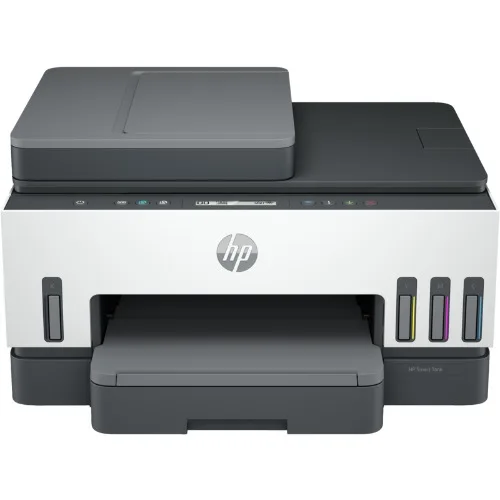

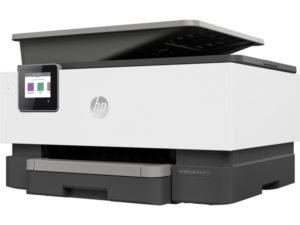
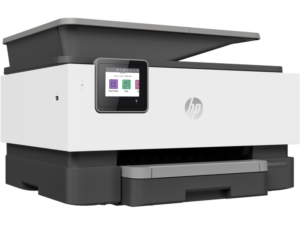
HP Smart Tank 750 All-in-one Printer

Product details
-
Connectivity, standard:Hi-Speed USB 2.0; Wi-Fi; Bluetooth LE; LAN
-
Mobile printing capability:Apple AirPrint; Chrome OS; HP Print Service Plugin (Android printing); HP Smart app; Mopria™ certified; Wi-Fi Direct Printing
-
Duty cycle (monthly, A4):Up to 5,000 pages
-
Duty cycle (monthly, letter):Up to 5,000 pages
-
Paper handling input, standard:250-sheet input tray
-
Print technology:HP Thermal Inkjet
-
Borderless printing:Yes (up to 8.5 x 11 in, 210 x 297 mm)
- Scan resolution, optical:Up to 1200 dpi
Introducing the HP Smart Tank 750 Wireless All-in-One Cartridge-Free Ink Printer, the perfect solution for your home or small office printing needs. This innovative printer offers mobile print, scan, and copy capabilities, ensuring you can efficiently tackle all your tasks. With its sleek design and advanced features, the HP Smart Tank 750 is the ideal printer for those looking for convenience and reliability.
Experience the convenience of cartridge-free printing with the HP Smart Tank 750 All-in-One Printer. This high-quality printer features an automatic document feeder, making it easy to manage multiple pages at once. Designed with the user in mind, the HP 750 is compatible with the HP Instant Ink program, ensuring you never run out of ink when you need it most. The HP Smart Tank technology provides an eco-friendly alternative to traditional cartridge printers, offering a more sustainable and cost-effective solution. Enjoy wireless printing from your smartphone or tablet, and experience the freedom of an all-in-one printer that truly does it all. Upgrade your home or office setup with the HP Smart Tank 750 Wireless All-in-One Cartridge-Free Ink Printer today!
Shipping and Returns
Shipping cost is based on weight. Just add products to your cart and use the Shipping Calculator to see the shipping price.
We want you to be 100% satisfied with your purchase. Items can be returned or exchanged within 30 days of delivery.
There are no question found.
Quick Comparison
| HP Smart Tank 720 All-in-One (6UU46A) remove | HP Colour LaserJet Pro M479fdw Printer remove | HP Smart Tank 615 Wireless All-in-One (Y0F71A) remove | HP OfficeJet Pro 9013 All-in-one Printer remove | HP Colour Laser 150a Printer remove | |||||||||
|---|---|---|---|---|---|---|---|---|---|---|---|---|---|
| Name | HP Smart Tank 720 All-in-One (6UU46A) remove | HP Colour LaserJet Pro M479fdw Printer remove | HP Smart Tank 615 Wireless All-in-One (Y0F71A) remove | HP OfficeJet Pro 9013 All-in-one Printer remove | HP Colour Laser 150a Printer remove | ||||||||
| Image |  | 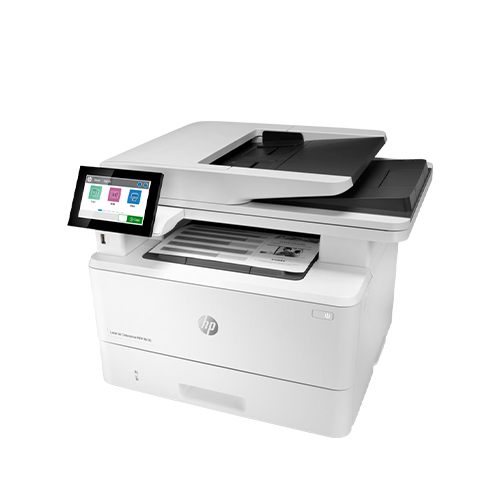 |  |  | 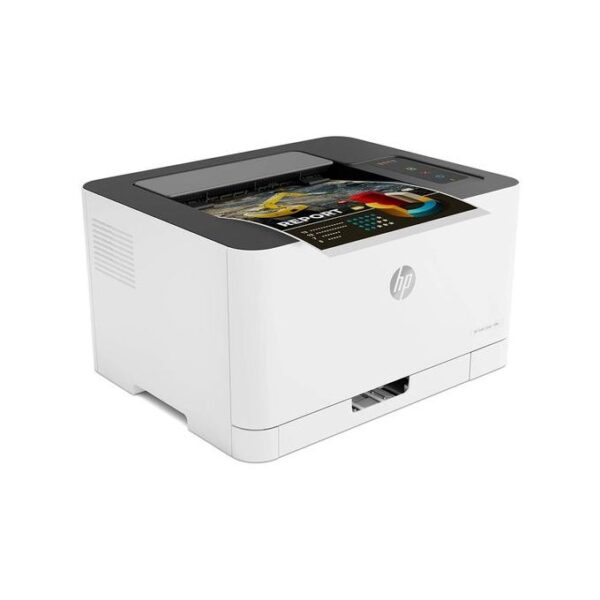 | ||||||||
| SKU | |||||||||||||
| Rating | |||||||||||||
| Price | ₦390,000.00 | ₦920,000.00 | ₦416,000.00 | ₦295,000.00 | ₦436,000.00 | ||||||||
| Stock |
20 in stock
|
20 in stock
| |||||||||||
| Availability | 20 in stock | 20 in stock | |||||||||||
| Add to cart | |||||||||||||
| Description | Functions
Print, scan, copy, wireless
Multitasking supported
No
Print speed black (ISO, A4)
Up to 15 ppm
Recommended monthly page volume
400 to 800 HP recommends that the number of pages per month of imaged output be within the stated range for optimum device performance, based on factors including supplies replacement intervals and device life over an extended warranty period.
Print technology
HP Thermal Inkjet
Printer drivers included
HP PCL 3 GUI
| Print Size: A4 / Functions: Print, Copy, Scan, Fax Print Speed: Up to 27 ppm Print Resolution: Up to 600 x 600 dpi Duplex Printing: Automatic (standard) Connectivity: Hi-Speed USB 2.0 port, host USB at rear side, Gigabit Ethernet, Wireless 802.11b/g/n 2.4/5 GHz Wi-Fi radio Paper Handling: 50 Sheet Multipurpose Tray, 250 Sheet Input Tray, 50 sheet Automatic Document Feeder | Functions
Print, copy, scan, fax, ADF, wireless
Multitasking supported
No
Print speed black (ISO, A4)
Up to 11 ppm
Recommended monthly page volume
400 to 800
Print technology
HP Thermal Inkjet
Printer drivers included
HP PCL 3 GUI
|
|
| ||||||||
| Content | Functions
Print, scan, copy, wireless
Multitasking supported
No
Print speed black (ISO, A4)
Up to 15 ppm
Recommended monthly page volume
400 to 800 HP recommends that the number of pages per month of imaged output be within the stated range for optimum device performance, based on factors including supplies replacement intervals and device life over an extended warranty period.
Print technology
HP Thermal Inkjet
Printer drivers included
HP PCL 3 GUI
Print quality black (best)
Black: Up to 1200 x 1200 rendered dpi Color: Up to 4800 x 1200 optimized dpi color when printing from a computer and 1200 input dpi
Display
TN, Reflective, Positive LCD 70 x 12mm
Processor speed
800 MHz
Print Cartridges/Bottle, Number
4 (1 each black bottle, set of 3 color bottles)
Print languages
HP PCL 3 GUI
Automatic paper sensor
Yes
Wireless capability
Yes, 2.4/5G dual band Wi-Fi, Wi-Fi Direct
Connectivity, standard
1 Wi-Fi Direct; 2 Hi-Speed USB 2.0 (device)
Minimum system requirements
Windows 10, 7: 32-bit or 64-bit, 2 GB available hard disk space, Internet connection, Internet Explorer. macOS v10.14 Mojave, macOS v10.15 Catalina, macOS v11 Big Sur; 2 GB HD; Internet required
Compatible operating systems
Windows 11; Windows 10; Windows 7; macOS 10.14 Mojave; macOS 10.15 Catalina; macOS 11 Big Sur; macOS 12 Monterey; macOS 13 Ventura; macOS 14 Sonoma Windows10, 7: 32-bit or 64-bit; macOS v10.14 Mojave, macOS v10.15 Catalina, macOS v11 Big Sur; 2 GB available hard disk space, Internet connection, Internet Explorer.
Mobile printing capability
Apple AirPrint; Mopria Print Service; HP Print Service Plugin (Android printing); HP Smart app; Wi-Fi Direct Printing [3]
Maximum Memory
128 MB
Paper handling input, standard
250-sheet input tray
Paper handling output, standard
100-sheet output tray
Duplex printing
Automatic
Media types
Plain Paper, HP Photo Papers, HP Matte Brochure or Professional Paper, HP Matte Presentation Paper, HP Glossy Brochure or Professional Paper, Other Photo Inkjet Papers, Other Matte Inkjet Papers, Other Glossy Inkjet Papers, Plain Paper, Light/Recycled
Borderless printing
Yes (up to 8.5 x 11 in, 210 x 297 mm)
Scanner type
Flatbed only
Scan file format
JPG; PDF; PNG; TIFF
Scan resolution, optical
Up to 1200 dpi
Bit depth
24-bit
File Format Supported
PDF; BMP; PNG; TIF; JPG
Scan input modes
Mopria Scan; Front Panel Copy; HP Software; EWS
Copy resolution (black text)
Up to 600 dpi
Copy resolution (color text and graphics)
Up to 600 x 600 dpi
Copy reduce / enlarge settings
25 to 400%
Copies, maximum
Up to 99 copies
Power
Input voltage: 100 to 240 VAC (+/- 10%), 50/60 Hz (+/- 3 Hz)
Power consumption
0.10 Watts (Off Mode), 2.00 Watts ( Sleep mode) [2]
Sustainable impact specifications
25% post-consumer recycled plastic; Recyclable through HP Planet Partners
Quantity per pallet
60
Count of layers in pallet
6
Software included
HP Printer Software, available online
Tech spec footnote
[1] Dimensions vary as per configuration
Tech spec footnote
[2] Power requirements are based on the country/region where the printer is sold. Do not convert operating voltages. This will damage the printer and void the product warranty.
Tech spec footnote
[3] Wireless performance is dependent upon physical environment and distance from the access point. Wireless operations are compatible with 2.4 and 5 GHz routers only; excludes wireless direct. Wireless direct may require driver or apps be installed and connected on wireless-enabled mobile device or PC. Wireless functionality may vary by computer and mobile operating systems, see http://hpconnected.com . Print times and connection speeds may vary. Apple, AirPrint, Mac, and macOS are trademarks of Apple Inc., registered in the U.S. and other countries. Use of the Works with Apple badge means that an accessory has been designed to work specifically with the technology identified in the badge and has been certified by the developer to meet Apple performance standards. Windows is a trademark of the Microsoft group of companies. Mopria®, the Mopria® Logo, and the Mopria Alliance™ word mark and logo are registered and/or unregistered trademarks and service marks of Mopria Alliance, Inc. in the United States and other countries. Unauthorized use is strictly prohibited
Tech spec footnote
[4] Speed specifications have been updated to reflect current industry testing methods.
Tech spec footnote
[5] Either after first page or after first set of ISO test pages. For details see: http://hp.com/go/printerclaims
Tech spec footnote
[6] Average based on ISO/IEC 24711 or HP testing methodology and continuous printing. Actual yield varies considerably based on content of printed pages and other factors. For details see http://hp.com/go/learnaboutsupplies
Tech spec footnote
[7] Based on HP internal A4 Memo draft document methodology. For details see https://h20195.www2.hp.com/v2/GetDocument.aspx?docname=4AA8-4168ENW .
Tech spec footnote
[10] Program availability varies. For details, see http://www.hp.com/recycle.
Tech spec footnote
[11] Post-consumer recycled is based on the definition set in the EPEAT standard for imaging equipment, IEEE 1680.2, and is expressed as percent of total weight of plastic.
| Product Specifications HP Colour LaserJet Pro MFP M479fdw Printer (W1A80A) - Print Size: A4, Functions: Print, Copy, Scan, Fax, Print Speed: Up to 27ppm mono, Print Resolution: Up to 600 x 600 dpi, Duplex Printing: Automatic (default), Memory: 512MB NAND Flash, 512MB DRAM, Connectivity: 1 x Hi-Speed USB 2.0 port, 1 x host USB at rear side, 1 x Gigabit Ethernet, 1 x Wireless 802.11b/g/n 2.4/5 GHz Wi-Fi radio, Paper Handling: 50 Sheet Multipurpose Tray, 250 Sheet Input Tray, 50 sheet Automatic Document Feeder, 4.3 inch intuitive colour touchscreen, Apple AirPrint, Google Cloud Print, HP ePrint, HP Smart App, Mobile Apps, Mopria Certified, Wi-Fi Direct Printing, Roam capable for easy printing In the Box HP Colour LaserJet Pro MFP M479fdw Printer (W1A80A), Black/Cyan/Yellow/Magenta Introductory Toner Cartridges, Regulatory flyer (CD replacement), Unpack flyer, Installation guide, Power cord, Warranty cards. No USB cable included, please purchase separately | Functions
Print, copy, scan, fax, ADF, wireless
Multitasking supported
No
Print speed black (ISO, A4)
Up to 11 ppm
Recommended monthly page volume
400 to 800
Print technology
HP Thermal Inkjet
Printer drivers included
HP PCL 3 GUI
Print quality black (best)
Black: Up to 1200 x 1200 rendered dpi Color: Up to 4800 x 1200 optimized dpi color (when printing from a computer and 1200 input dpi)
Display
2.2-inch Touchscreen MGD (Mono graphics)
Processor speed
800 MHz
Print Cartridges/Bottle, Number
4 (1 each black bottle, set of 3 color bottles)
Print languages
HP PCL 3 GUI
Automatic paper sensor
No
Wireless capability
Yes, built-in self-healing dual band Wi-Fi 802.11b/g/n, Wireless direct
Connectivity, standard
1 Wi-Fi Direct; 2 Hi-Speed USB 2.0 (device)
Connectivity, optional
None
Minimum system requirements
Windows 10, 8.1, 8, 7: 32-bit or 64-bit, 2 GB available hard disk space, Internet connection, USB port, Internet Explorer. OS X v10.11 El Capitan and above, Internet Access
Compatible operating systems
Windows 11; Windows 10; Windows 8; Windows 8.1; Windows 7; macOS 10.11 El Capitan; macOS 10.12 Sierra; macOS 10.13 High Sierra; macOS 10.14 Mojave; macOS 13 Ventura; macOS 14 Sonoma macOS 14 Sonoma; Windows 11; Windows 10; Windows 8; Windows 8.1; Windows 7; macOS 10.11 El Capitan; macOS 10.12 Sierra; macOS 10.13 High Sierra; macOS 10.14 Mojave; macOS 13 Ventura.
Mobile printing capability
Apple AirPrint; Mopria Print Service; HP Print Service Plugin (Android printing); Google Cloud Print™; Wi-Fi Direct Printing [3]
Maximum Memory
256 MB
Paper handling input, standard
100-sheet input tray
Paper handling output, standard
30-sheet output tray
Duplex printing
Manual (driver support provided)
Media types
Plain paper, Matte Brochure Papers, Glossy Brochure Papers, Photo papers, Envelopes, Other specialty inkjet papers
Borderless printing
Yes (up to 8.5 x 11 in, 210 x 297 mm)
Scanner type
Flatbed, ADF (optional)
Scan file format
JPEG, TIFF, PDF, BMP, PNG
Scan resolution, optical
Up to 1200 dpi
Bit depth
24-bit
Automatic document feeder capacity
Standard, Up to 35 sheets
Digital sending standard features
Everyday scan (scan to PDF); HP Smart Tasks
File Format Supported
BMP; PDF; JPG; PNG; TIF
Scan input modes
Front Panel Scan; Copy; Fax; HP Software; EWS
Copy speed (draft)
Black: Up to 22 cpm Color: Up to 14 cpm [4]
Copy resolution (black text)
Up to 600 dpi
Copy resolution (color text and graphics)
Up to 600 dpi
Copy reduce / enlarge settings
fit to page
Copies, maximum
Up to 99 copies
Faxing
Yes, color
Fax Resolution Black (best)
Up to 300 x 300 dpi
Fax Speed Dials, Maximum Number
Up to 99 numbers
Fax Broadcast Locations
20
Power
Input voltage 100 to 240 VAC (+/- 10%), 50/60 Hz (+/- 3 Hz). High voltage: Input voltage 200 to 240 VAC (+/- 10%), 50/60 Hz (+/- 3Hz). Not dual voltage, power supply varies by part number with # Option code identifier.
Power consumption
0.11 watts (manual-off), 3.82 watts (ready), 0.71 watt (sleep) [2]
Sustainable impact specifications
No
Quantity per pallet
50
Count of layers in pallet
5
What's in the box
HP Smart Tank Plus 615; HP GT53XL 135-ml Black Original Ink Bottle; HP GT52 Cyan Original Ink Bottle; HP GT52 Magenta Original Ink Bottle; HP GT52 Yellow Original Ink Bottle; Ink caution flyer; Repacking flyer; Setup guide; Reference guide; Regulatory flyer; China warranty card; China 3G card; QQ-Wechat flyer Power cord [For more information about fill and yield, see http://www.hp.com/go/learnaboutsupplies]
Cable included
WW: No, please purchase (USB) cable separately; AP: Yes, 1.5 m (USB) cable (except Taiwan, Hong Kong and Singapore)
Software included
HP Printer Software, HP Update, HP Photo Creations
Manufacturer Warranty
One year of 24/7 world-class technical support services through http://www.hp.com/support; One-year or 30,000 pages limited hardware warranty, whichever is earlier from the date of purchase; user replaceable parts have separate warranty periods
Tech spec footnote
[1] Dimensions vary as per configuration
Tech spec footnote
[2] Power requirements are based on the country/region where the printer is sold. Do not convert operating voltages. This will damage the printer and void the product warranty.
Tech spec footnote
[3] Wireless performance is dependent upon physical environment and distance from the access point. Wireless operations are compatible with 2.4 GHz routers only; excludes wireless direct. Wireless direct may require driver or apps be installed and connected on wireless-enabled mobile device or PC. Wireless functionality may vary by computer and mobile operating systems, see http://hpconnected.com. Print times and connection speeds may vary. AirPrint™ supports macOS Mojave, iOS 4.2 or later and requires the printer be connected to the same network as your macOS or iOS device. AirPrint, the AirPrint Logo and macOS are trademarks of Apple Inc. Windows is a trademark of the Microsoft group of companies.
Tech spec footnote
[4] Speed specifications have been updated to reflect current industry testing methods.
Tech spec footnote
[5] Either after first page or after first set of ISO test pages. For details see: http://hp.com/go/printerclaims
Tech spec footnote
[6] Average based on ISO/IEC 24711 or HP testing methodology and continuous printing. Actual yield varies considerably based on content of printed pages and other factors. For details see http://hp.com/go/learnaboutsupplies
Tech spec footnote
[7] Based on HP internal A4 Memo draft document methodology. For details see https://h20195.www2.hp.com/v2/GetDocument.aspx?docname=4AA8-4168ENW .
| A revolutionary smart printer that works the way you need it. Help save time with Smart Tasks shortcuts. Get automatic two-sided printing and scanning, seamless connections, and best-in-class security. Print and scan from your phone.
Dynamic security enabled printer. Only intended to be used with cartridges using an HP original chip. Cartridges using a non-HP chip may not work, and those that work today may not work in the future.
Functions
| Product overview Get productive print performance at an affordable price, and easily produce high-quality colour results. Dynamic security enabled printer Certain HP printers are intended to work only with cartridges that have a new or reused HP chip or electronic circuitry. These printers use dynamic security measures to block cartridges using a non-HP chip or electronic circuitry. Periodic firmware updates will maintain the effectiveness of these measures and block cartridges that previously worked. Reused HP chips and electronic circuitry enable the use of reused, remanufactured, and refilled cartridges. Legendary HP quality at an affordable price This surprisingly small laser delivers exceptional quality, page after page. Designed to fit your space Work efficiently with a small, compact printer – world's smallest in-class. Key Features Uncompromising laser quality This surprisingly small laser delivers exceptional quality, page after page. Sharp black text, high-quality colour Produce sharp text, bold blacks, and crisp color graphics. The right price Rely on a high-performance laser printer at an affordable price. Fast printing Get print speeds up to 18/4 ppm. Small, compact size You can fit this printer almost anywhere – it’s that small and compact. Original HP Cartridges HP 117A Black Original Laser Toner Cartridge (yield: 1,000 pages) HP 117A Cyan Original Laser Toner Cartridge (yield: 700 pages) HP 117A Yellow Original Laser Toner Cartridge (yield: 700 pages) HP 117A Magenta Original Laser Toner Cartridge (yield: 700 pages) In the box What's in the box HP Color Laser 150a Printer Preinstalled introductory HP 117A Laser Printer cartridges (700 pages black, 500 pages cyan, yellow, magenta) Imaging drum Toner collection unit Setup poster Reference guide Support flyer Warranty guide No CD-ROM Power cord cable(s) No, please purchase USB cable separately Colour White Brand Connectivity Wired Print speed black (ISO, A4) Up to 18 ppm Print Speed Color (ISO) Up to 4 ppm First page out black (A4, ready) As fast as 12.4 sec First page out color (A4, ready) As fast as 25.3 sec Duty cycle (monthly, A4) Up to 20,000 pages Recommended monthly page volume 100 to 500 Print technology Laser Print quality black (best) 600 x 600 dpi 4 bits Print quality color (best) 600 x 600 dpi 4 bits Display LED Wireless capability No Connectivity, standard Hi-Speed USB 2.0 port Compatible Operating Systems Windows: 7 (32/64-bit), 2008 Server R2, 8 (32/64-bit), 8.1 (32/64-bit), 10 (32/64-bit), 2012 Server, 2016 Server Memory 64 MB Maximum Memory 64 MB Paper handling input, standard 150 sheet input tray Paper handling output, standard 50 sheet output bin Duplex printing Manual (driver support provided) Finished output handling Sheetfed Media sizes supported Tray 1: A4 A5 A6 B5 (JIS) Oficio (216 x 340 mm) Tray 2: Not supported Optional Automatic duplexer: Not supported Media types Plain, Light, Heavy, Extra Heavy, Coloured, Preprinted, Recycle, Labels, Bond, Glossy Ecolabels CECP Sustainable impact specifications Mercury free Operating temperature range 10 to 30°C Recommended operating humidity range 20 to 70% RH (non-condensing) Minimum dimensions (W x D x H) 382 x 309 x 211.5 mm Maximum dimensions (W x D x H) 382 x 397.8 x 274.4 mm Weight 10.04 kg Manufacturer Warranty One-year limited hardware warranty | ||||||||
| Weight | 8 kg | 24 kg | N/A | N/A | 10.6 kg | ||||||||
| Dimensions | N/A | N/A | N/A | N/A | 382 × 397.8 × 274.4 cm | ||||||||
| Additional information |
|
|
| ||||||||||
| Sold | 0 | 0 | 0 | 0 | 0 | ||||||||
| Shipping |


Rating & Review
There are no reviews yet.